
One link. A whole sales team.
Agents, stokis and fans share their own link. BCL records every referral and works out the commission. You pay them and mark it paid.
Trusted by these companies













































What you get
Multi-level rewards, a dashboard for every agent and payouts you approve, shown screen by screen.
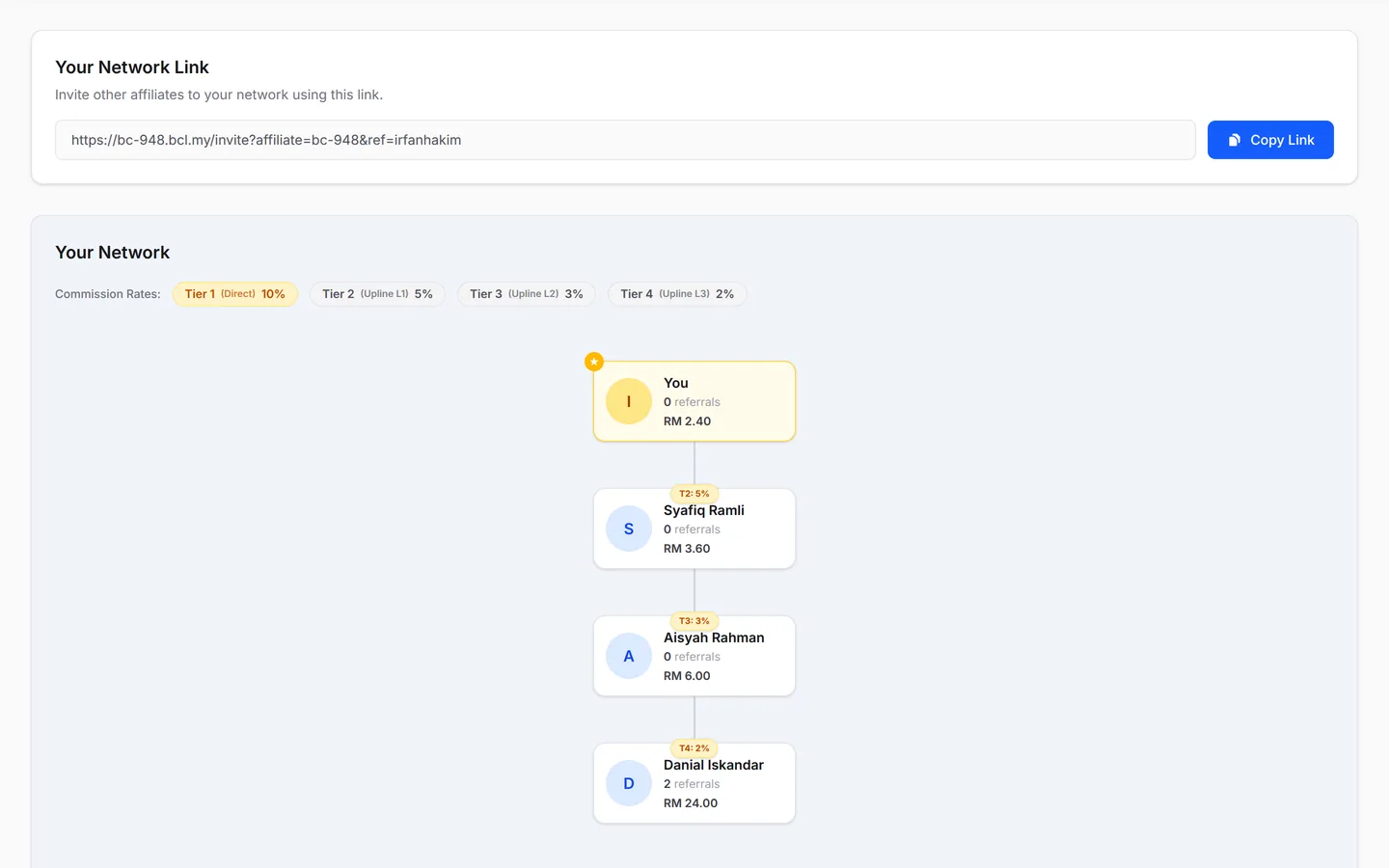
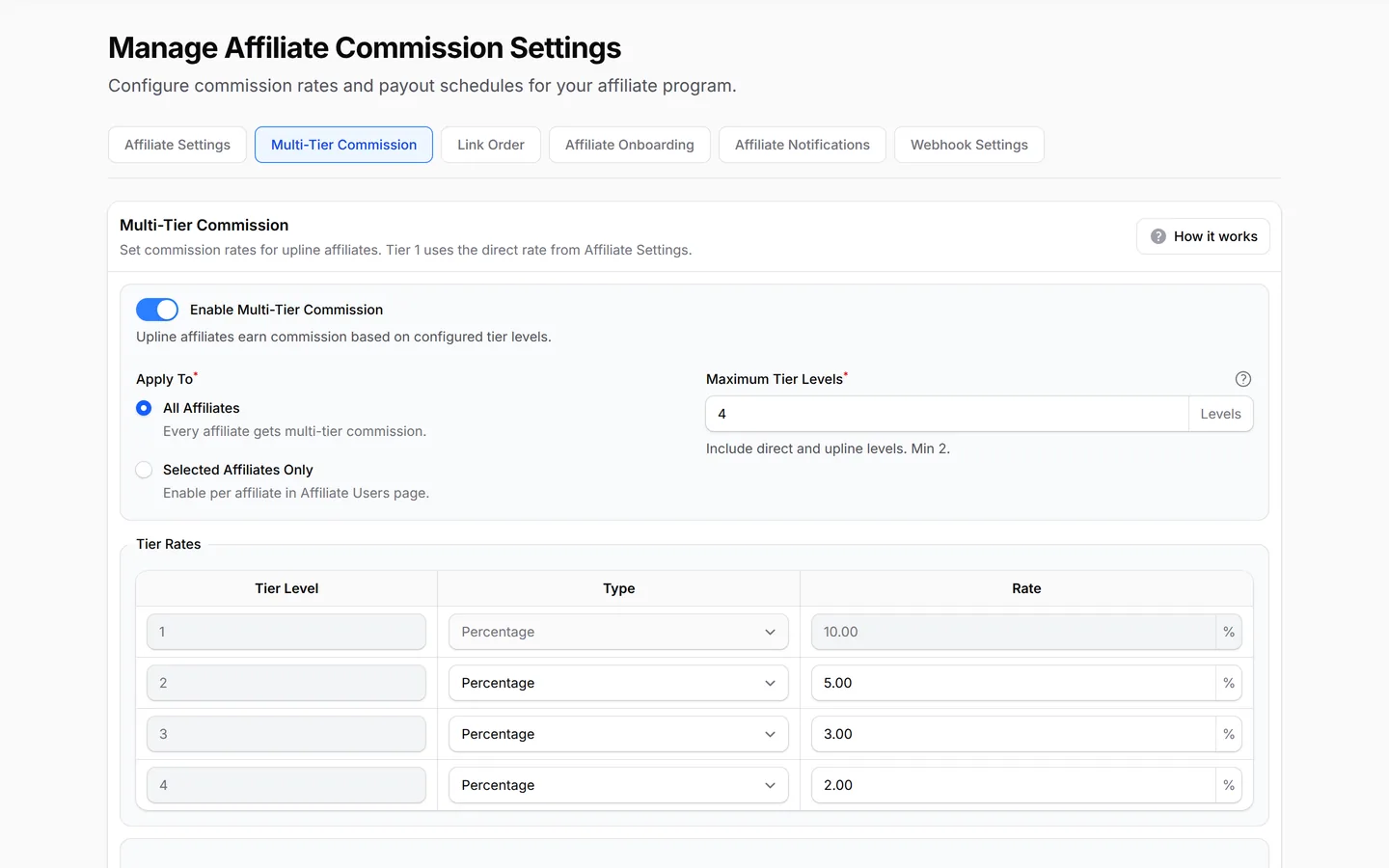
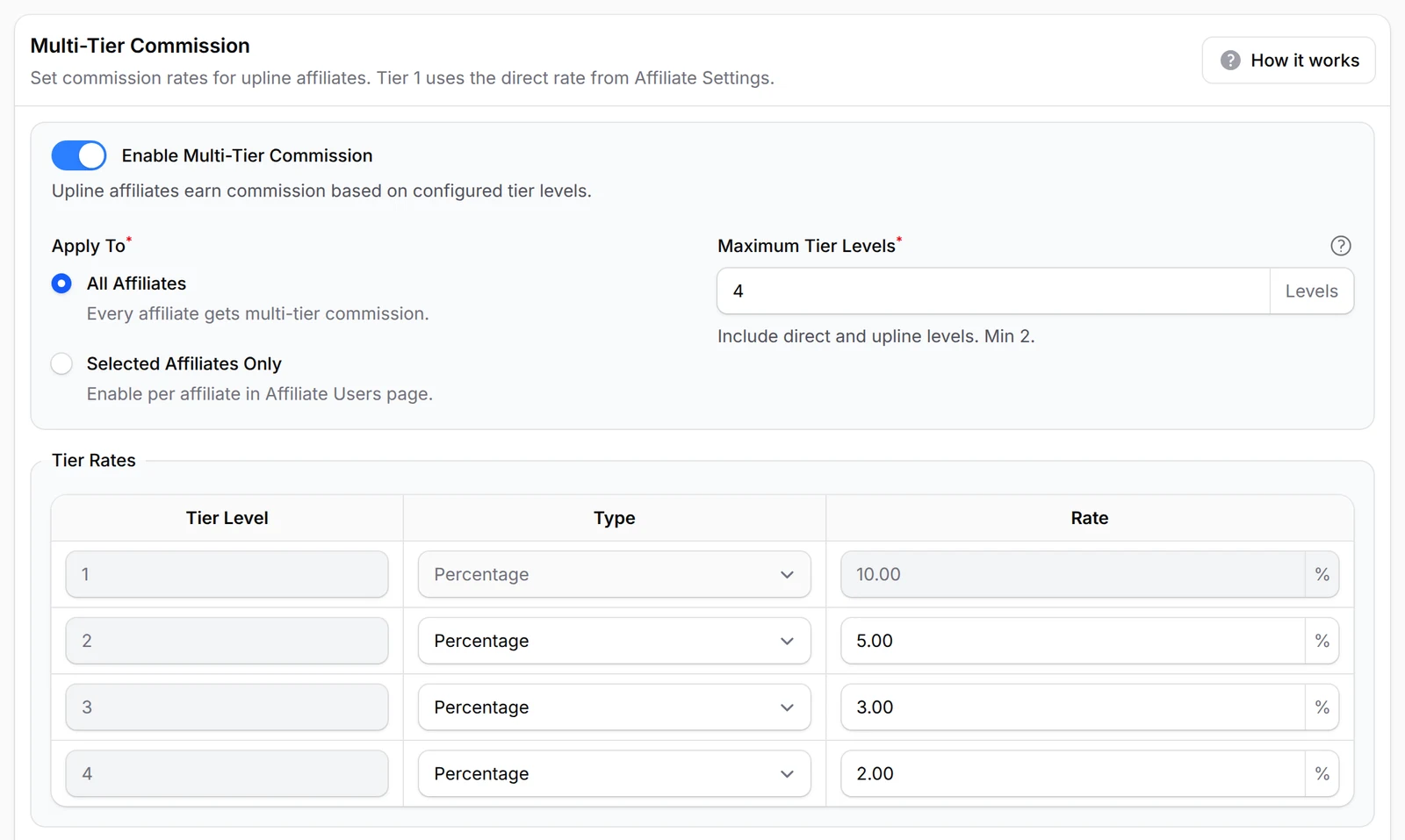
Reward the whole team, up to 10 levels
Turn on Enable Multi-Tier Commission and give each level its own rate, as a percentage or a flat amount. When an agent sells, whoever recruited them earns a smaller share of the same sale, which gives your best sellers a reason to build a team. Maximum Tier Levels goes from 2 up to 10.
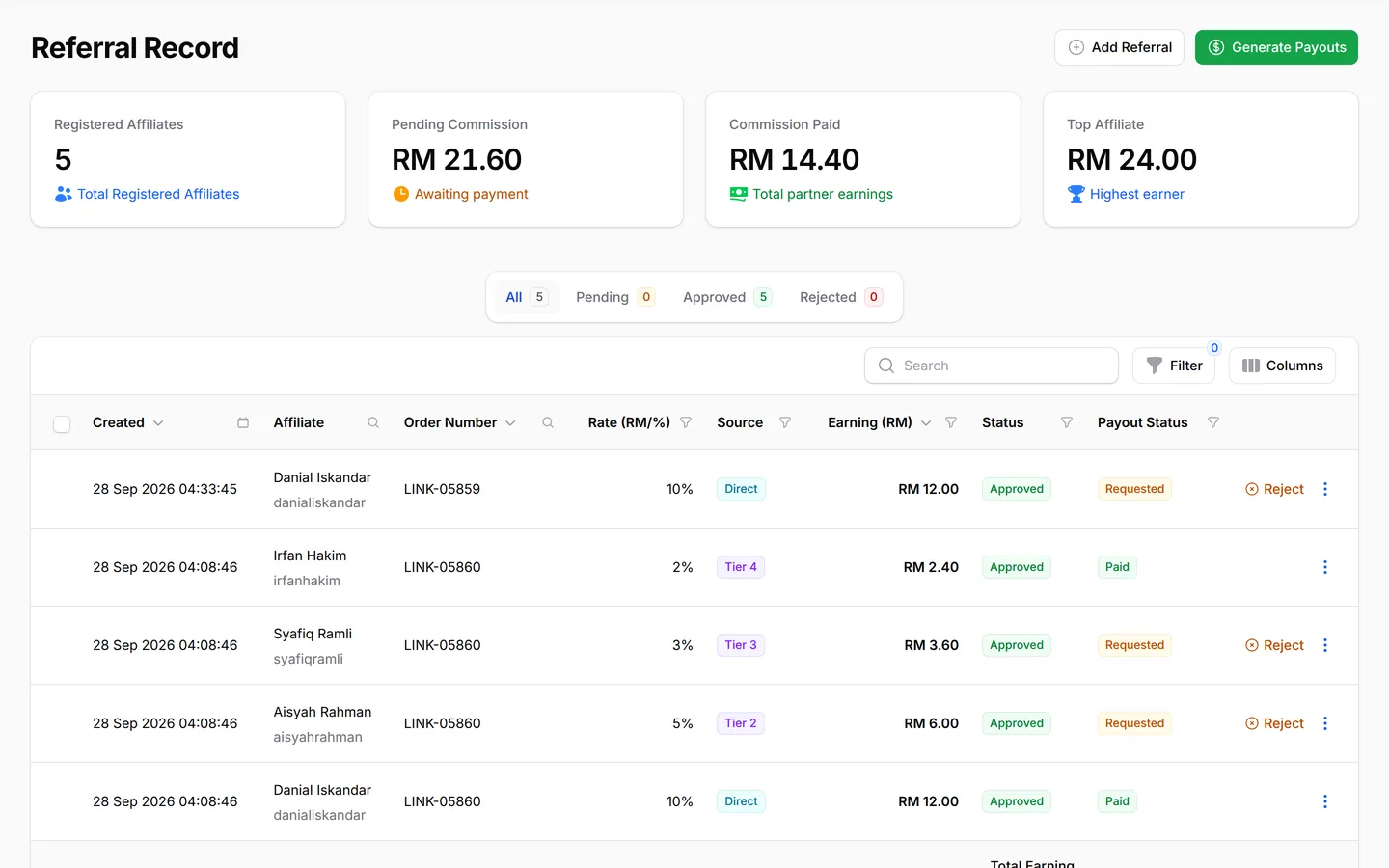
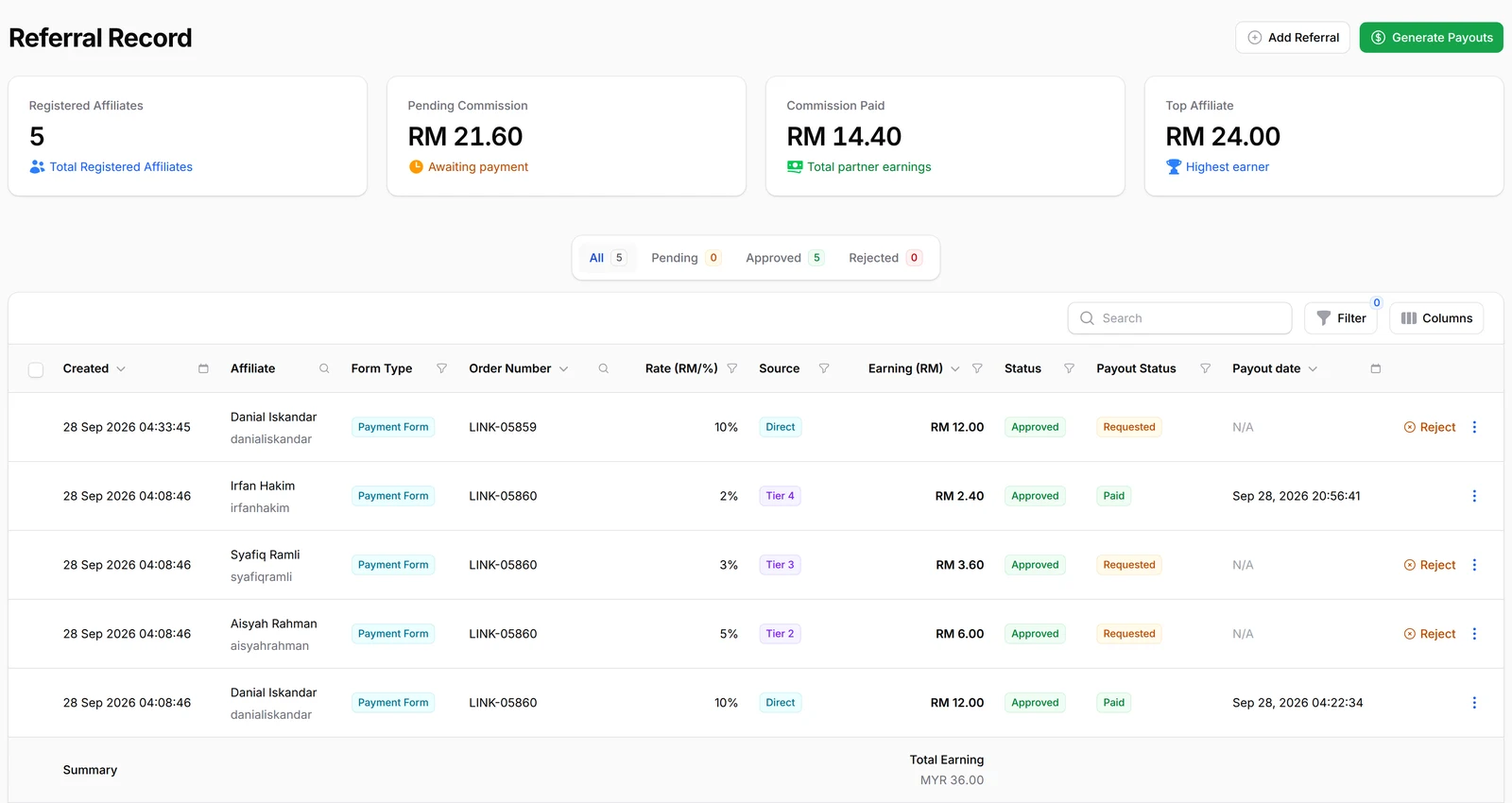
One sale, every level recorded
One order through a multi-tier chain becomes one referral per level, marked Direct, Tier 2, Tier 3 and so on in the Source column. When an agent asks why they earned a certain amount, the answer is right there. Each row shows the rate, the earning and where the payout stands.
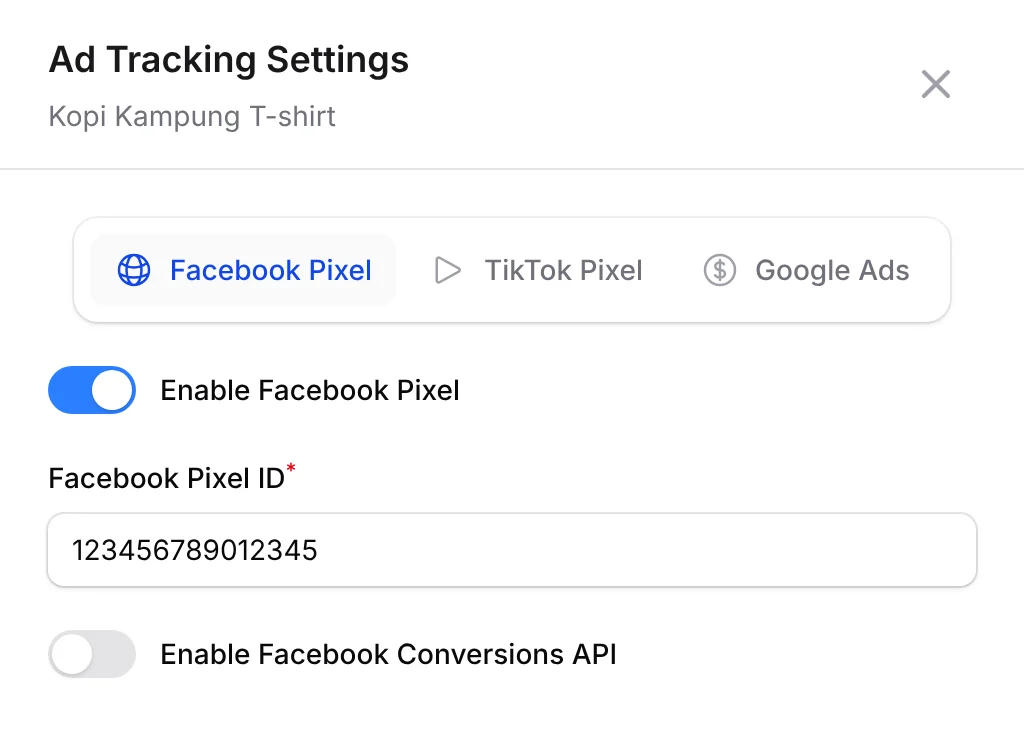
Each affiliate tracks their own ads
Your affiliates can add their own Meta, TikTok or Google Ads pixel to your form. Each one sees only the sales from their own ads, so they can run ads for you with confidence.
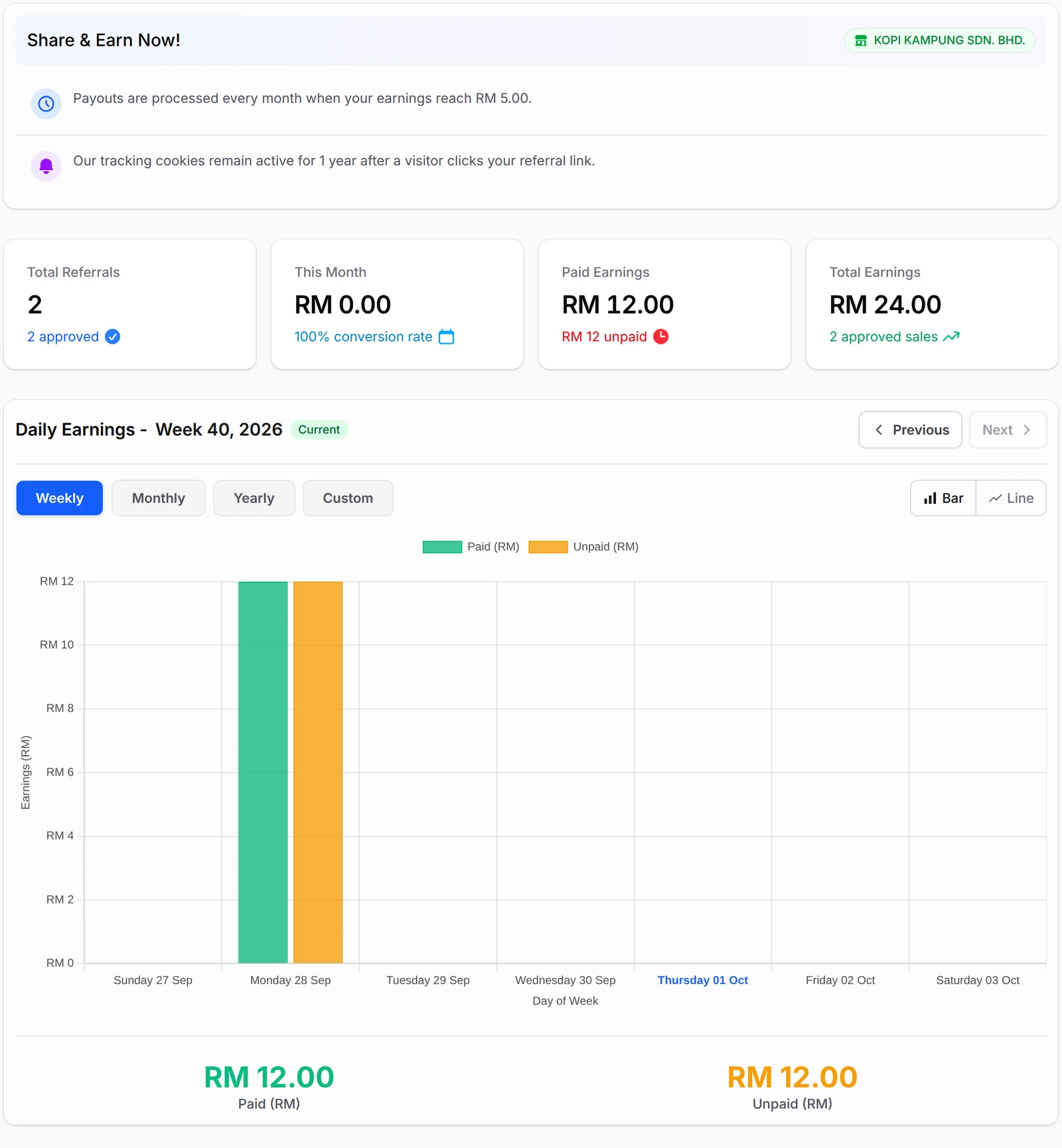
Your agents get their own dashboard
Affiliates sign in at bcl.my/affiliate to a dashboard of their own, separate from yours. Share & Earn Now! shows your payout schedule and minimum, and a chart tracks their paid and unpaid commission over time. Agents check their own numbers, so fewer of them message you to ask.
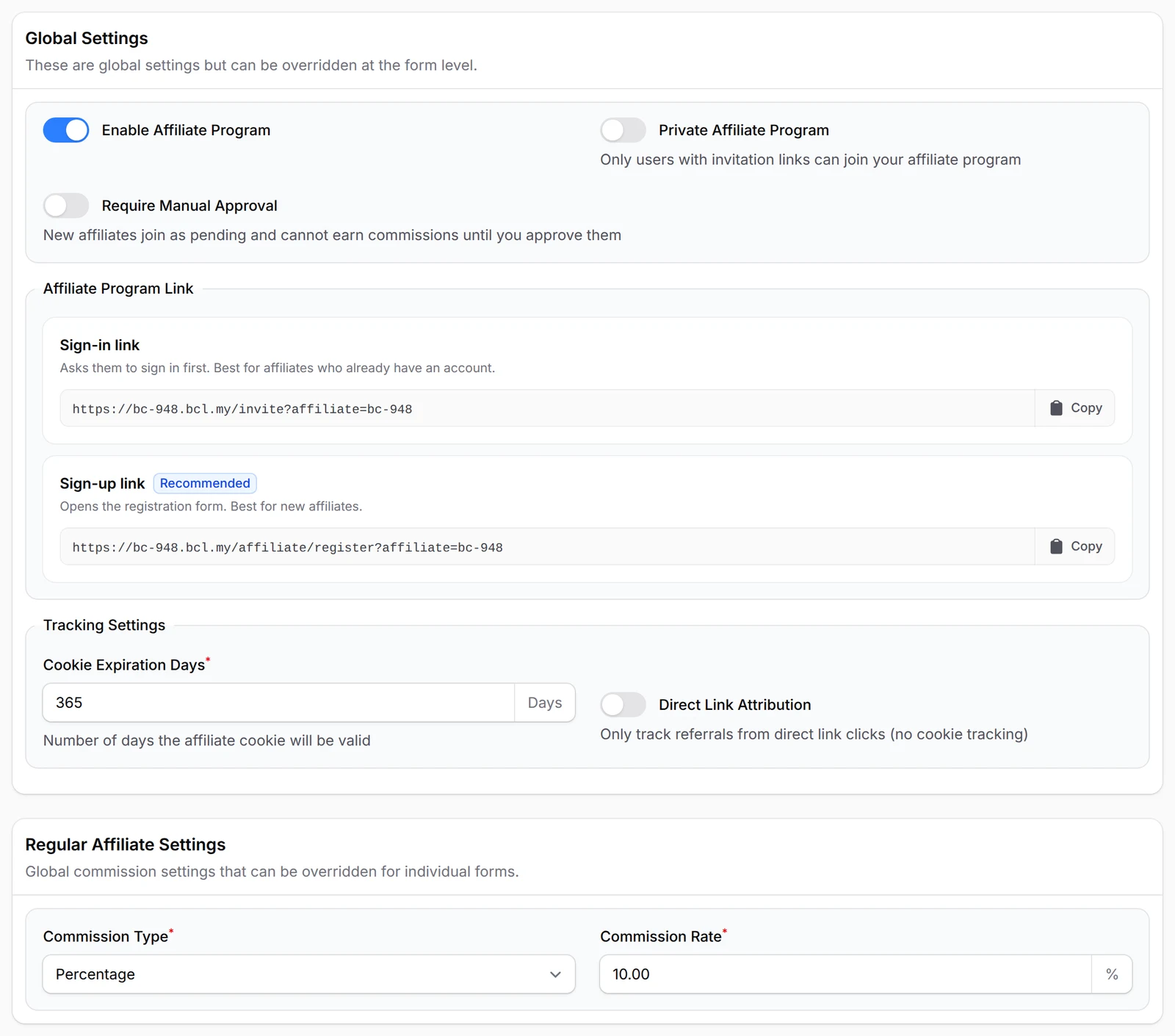
Your programme, your rules
Set your commission as a Flat Rate or a Percentage, then decide who gets in: Private Affiliate Program keeps it invite-only, and Require Manual Approval holds every new sign-up until you say yes. Cookie Expiration Days sets how long after a click a sale still counts for the agent.
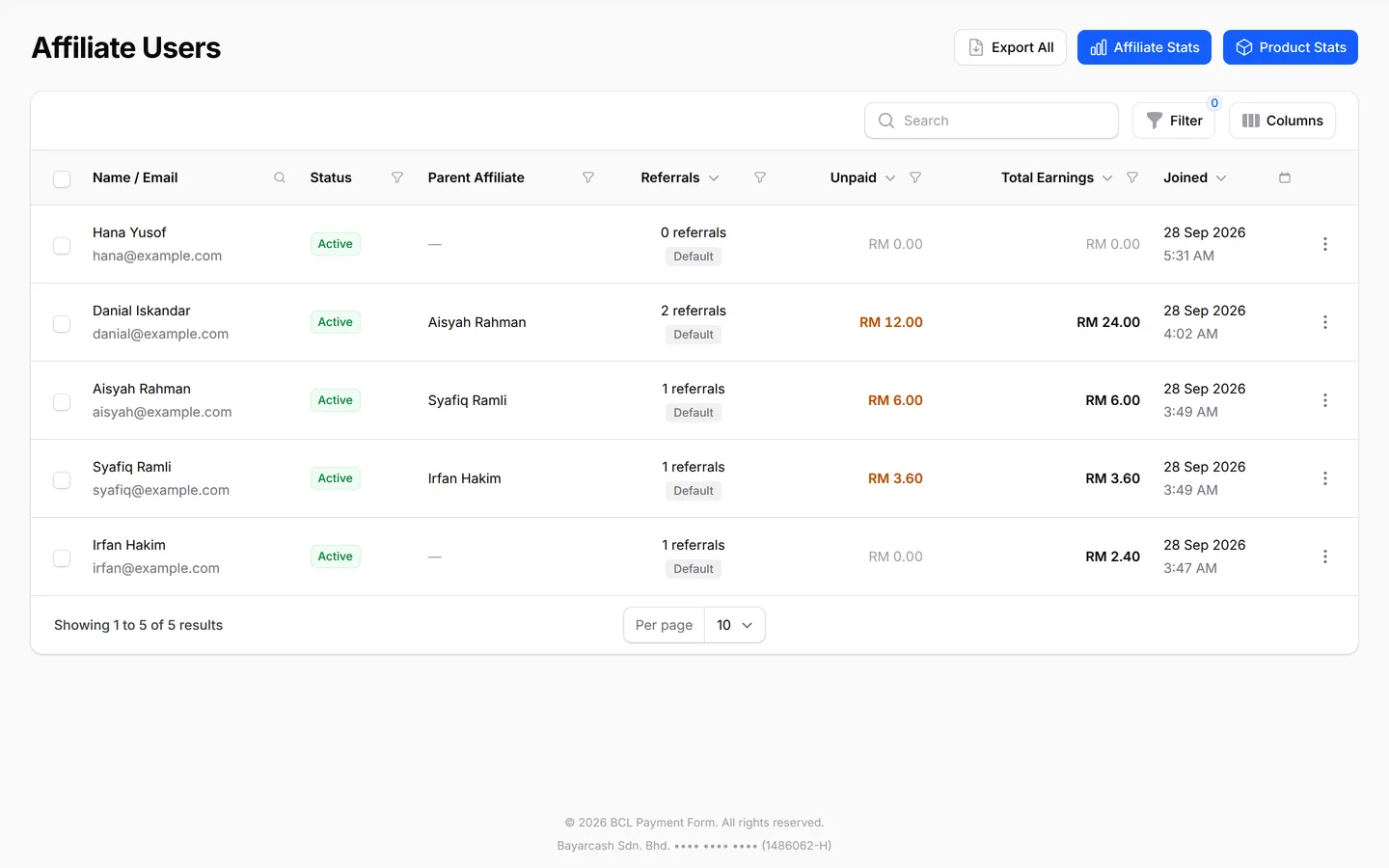
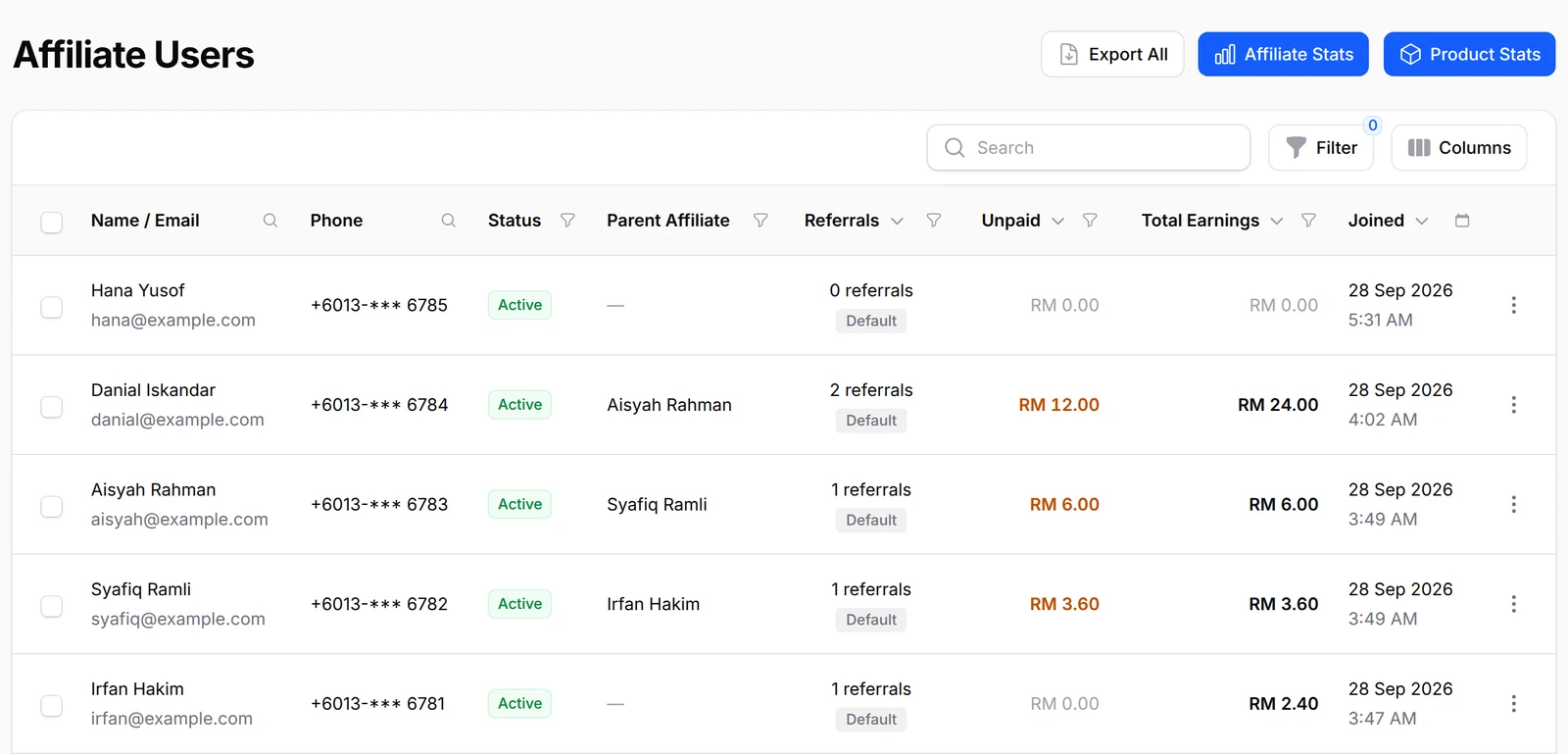
Everyone in one list
Affiliate Users lists every agent with their status, their upline, successful referrals, unpaid and total earnings, and the day they joined. Before payday, filter by Has Bank Details to spot who cannot be paid by transfer yet. Suspending an agent can be undone later; removing them cannot.
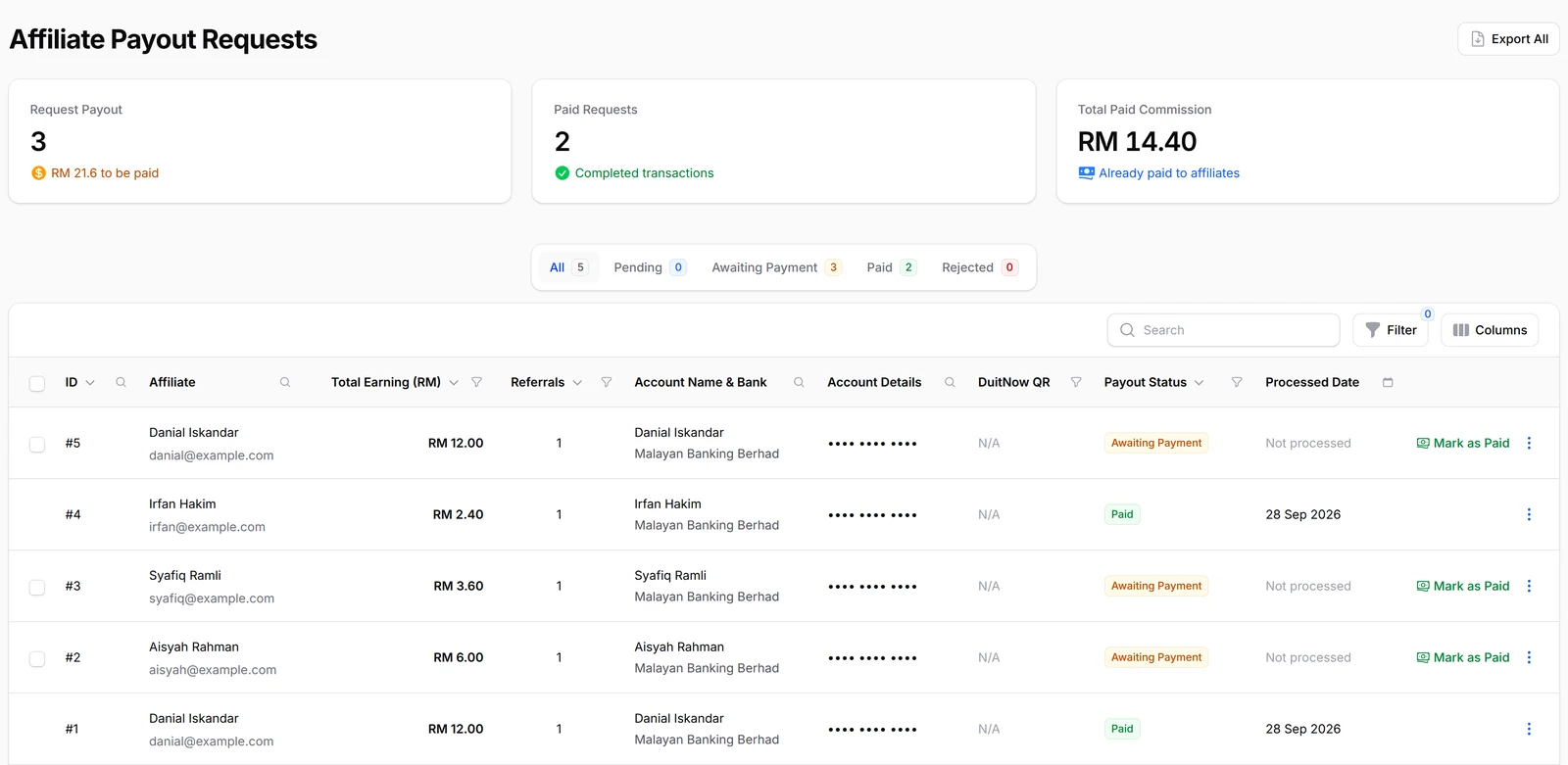
You approve & pay
Approved commission waits under Awaiting Payment, with each agent's bank details and DuitNow QR beside it. Pay from your own bank, click Mark as Paid and add the payment reference, and the agent is notified. BCL never moves the money itself, so you stay in control of every ringgit.
What you can do
Switch it on per form, reward per item, share marketing media and give each affiliate pixels.
Turn it on per form
Enable Affiliates on each form affiliates may promote. Share your Sign-up link, and approve joiners with Require Manual Approval if you like.
Their own dashboard
Affiliates see their links, referrals, marketing media and payouts, and the clicks on their links in Traffic Logs, never your BCL account.
Multi-tier commission
2 to 10 levels, Percentage or Flat Rate per tier, every tier a share of the same sale. Assign Parent Affiliate to fix a chain.
Per-item commission
Set Commission Calculation to Per item and give each product, variation option or ticket its own % or RM rate, or 0.
Give one affiliate a custom rate
Turn on Enable Custom Commission for one person, or Add Form Override for one form. BCL uses their form override first, then their custom rate, the form's rate and your programme rate.
Marketing media
Give affiliates banners and links, and email them announcements.
Payout rules
Minimum Payout Threshold, a Payout Schedule of Weekly or Monthly, Request Payout from the affiliate side or Disable Payout Requests, and Export All for bulk transfers.
Affiliate pixels
An affiliate can add their own Meta, TikTok or Google Ads pixel for your form and see only the purchases they referred.
Used by
Boutique stokis, friends sharing a Raya menu, run club captains and referring parents all earn commission from it.
Jobs it helps with
Good to know
Limits to check before you build, and the add-ons that some features need.
- Payouts are not automatic. You transfer the money and mark the payout as paid.
- Forms that use Direct Debit cannot have affiliates.
- A sale counts only if the buyer came through the affiliate's link within your Cookie Expiration Days, on a form with Enable Affiliates on.
- Per item is offered on Multiple Items, Items with Variations and event forms. Booking forms use one rate per order.
- A custom rate given to one affiliate comes before per-item rates.
- Referrals added by hand pay the seller only, not the uplines.
See it live
Opens a live example page. Please do not pay.
Questions owners ask
Commission payouts, whether agents need an account, recruiting sub-agents and per-product rates, made clear.
Does BCL pay my affiliates automatically?
No. BCL works out and tracks the commission, but you approve each payout, transfer the money yourself, then click Mark as Paid under Affiliate → Payout.
Do affiliates need their own BCL account?
They need an affiliate account, which they create from your Sign-up link. It is separate from your BCL dashboard: they only see their links, referrals, marketing media and payouts.
Can my affiliates recruit other affiliates and earn from their sales?
Yes. Turn on Enable Multi-Tier Commission, set Maximum Tier Levels (2 to 10) and a rate for each tier. Every tier is a share of the same sale, not of the commission below it.
Can affiliates earn more on some products than others?
Yes. Set Commission Calculation to Per item on the form and give each item its own rate, or 0 for items that earn nothing.
How do I turn on affiliates for a form?
Go to Affiliate → Settings, turn on Enable Affiliate Program, set your default Commission Type and Commission Rate, the Minimum Payout Threshold and the Payout Schedule, then click Save Affiliate Settings. Then turn on Enable Affiliates on each form affiliates may promote and click Update Form.
Do I need an add-on for affiliates?
No. Affiliate comes with every BCL account and is not an add-on. Switch it on under Affiliate → Settings.
What is BCL, and how does it work with Bayarcash?
BCL is a no-code selling platform for Malaysian small businesses: you build payment forms, payment links, tickets and bookings, share one link and see every sale. Bayarcash is the payment gateway behind it: it collects the payment and pays it out to your bank, minus its fee. To take real payments you need an approved Bayarcash merchant account.
How do refunds work?
BCL has no refund button. Return the money to your customer yourself (for example by bank transfer), then cancel the order in BCL so your records match.
Step-by-step guides
Set it up with the help pages on docs.bcl.my.
Ready when you are.
Set up your first form today and try it out. When you are ready for real payments, connect Bayarcash and the same form goes live.