
Fill your calendar. Stop the back and forth.
Customers pick a service, a time and a staff member, then pay. You stop asking 'slot ada lagi tak?'.
Trusted by these companies













































Before & after BCL
Endless slot questions and paper diaries give way to a booking form that blocks taken times.
How it works
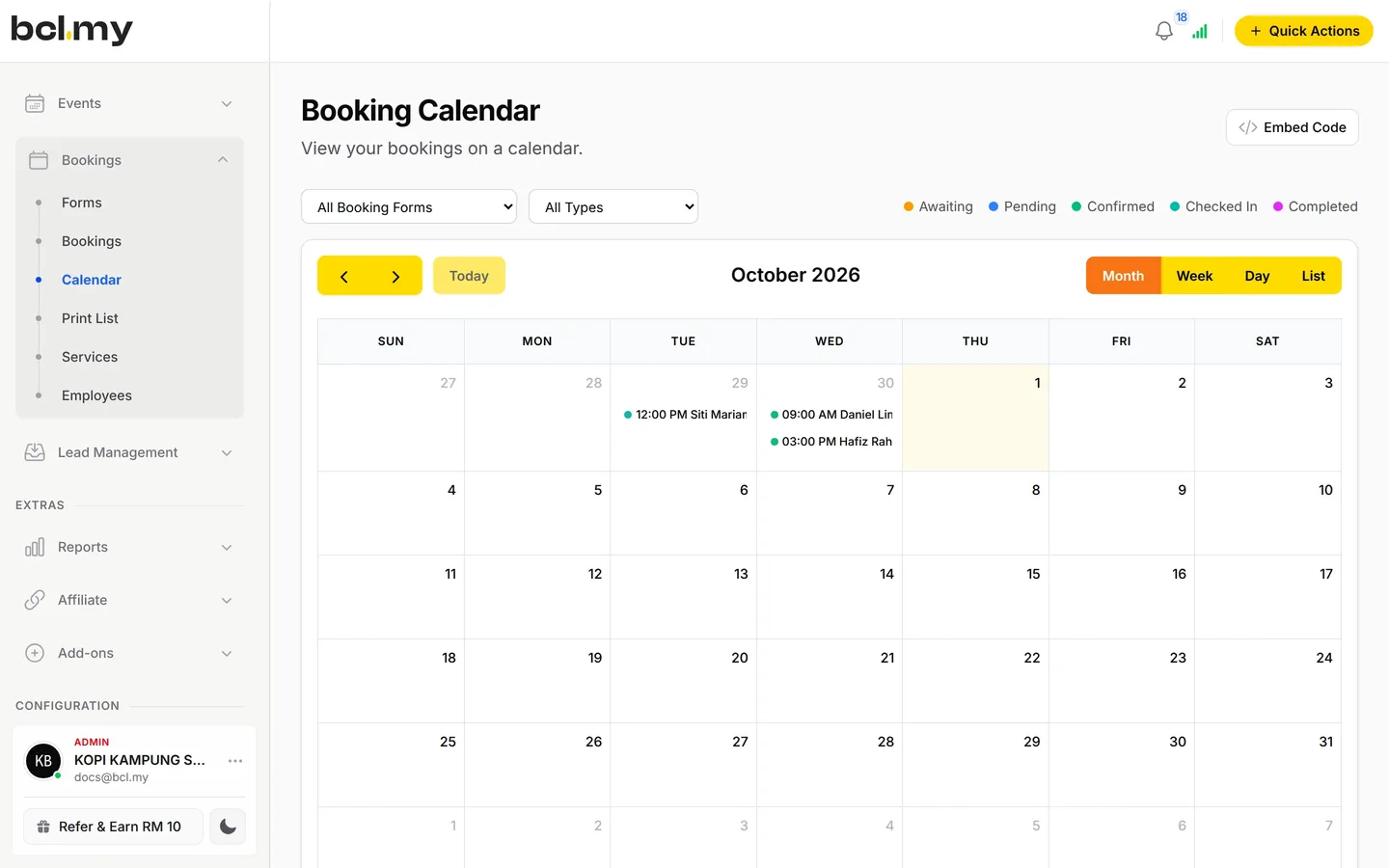
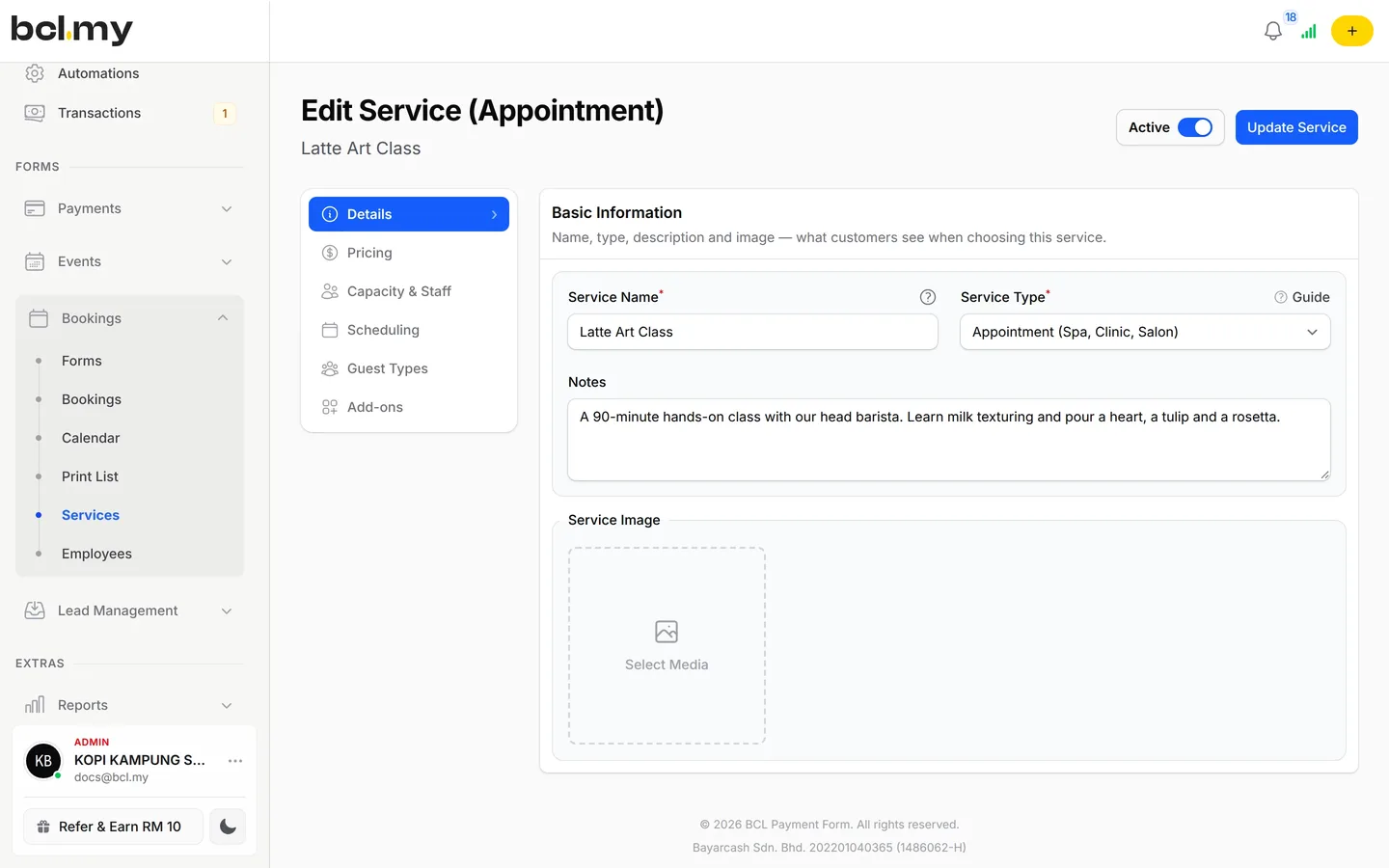
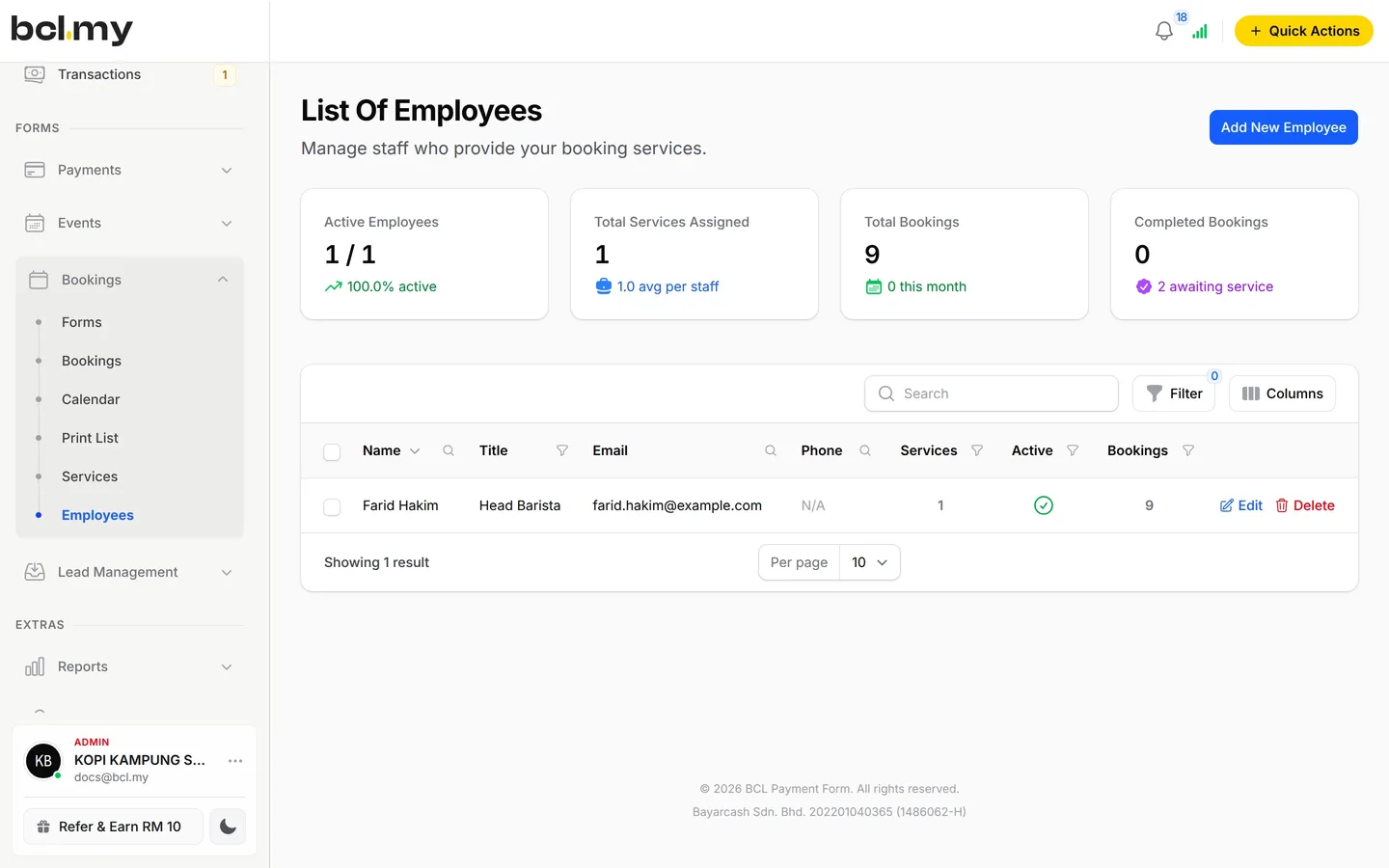
Add staff and services first, build the form, share it, then run the day from the calendar.
What you can do
Five booking types, per-staff hours, weekend pricing, walk-ins and QR check-in cover a busy day.
Five booking types
Appointment, Reservation, Ticket, Accommodation and Court.
Staff hours
Each employee has working days and hours. Customers can pick a staff member or leave it to you.
Weekend & peak prices
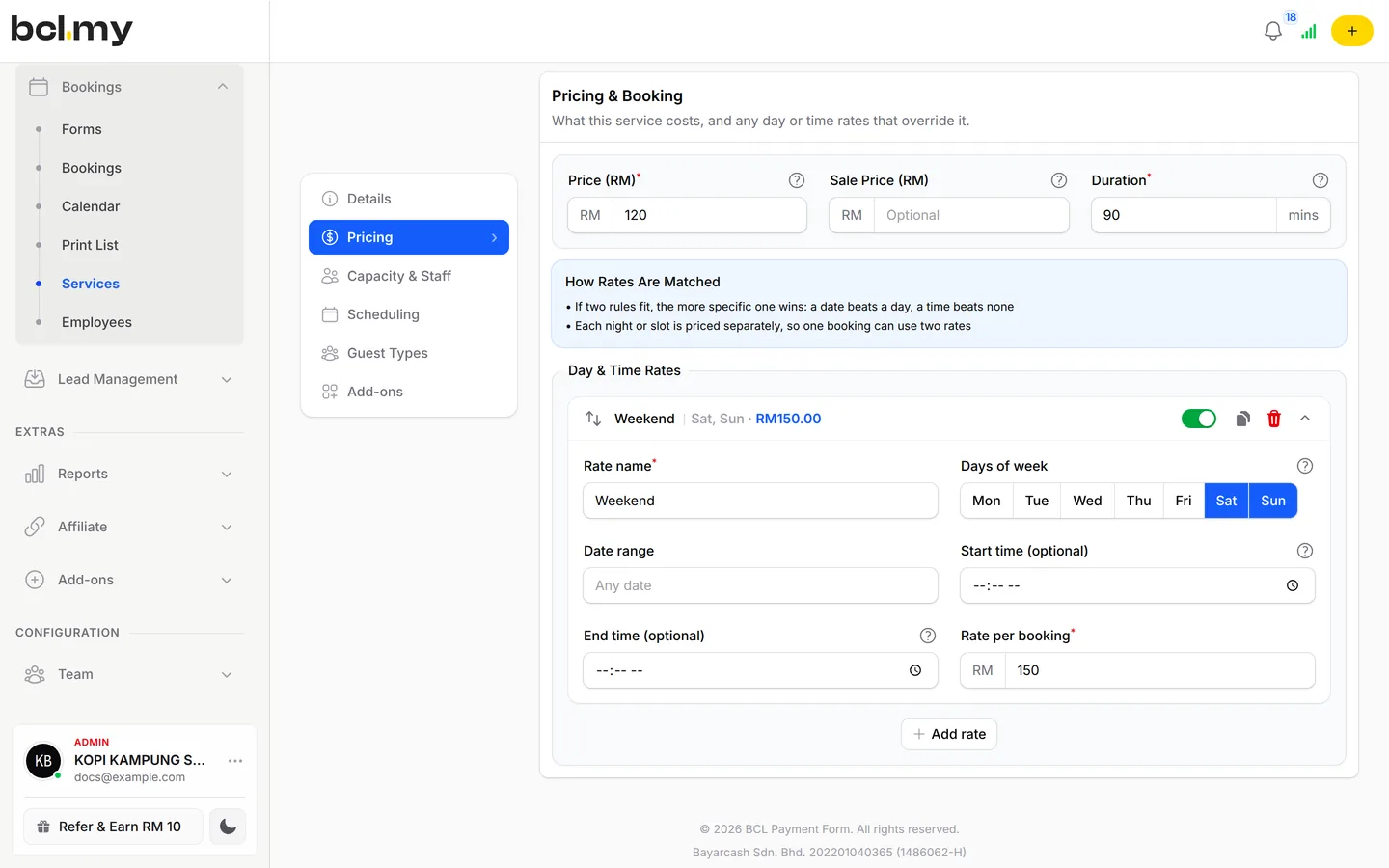
Day & Time Rates charge a different price on weekends, public holidays or at certain times.
Walk-ins & rescheduling
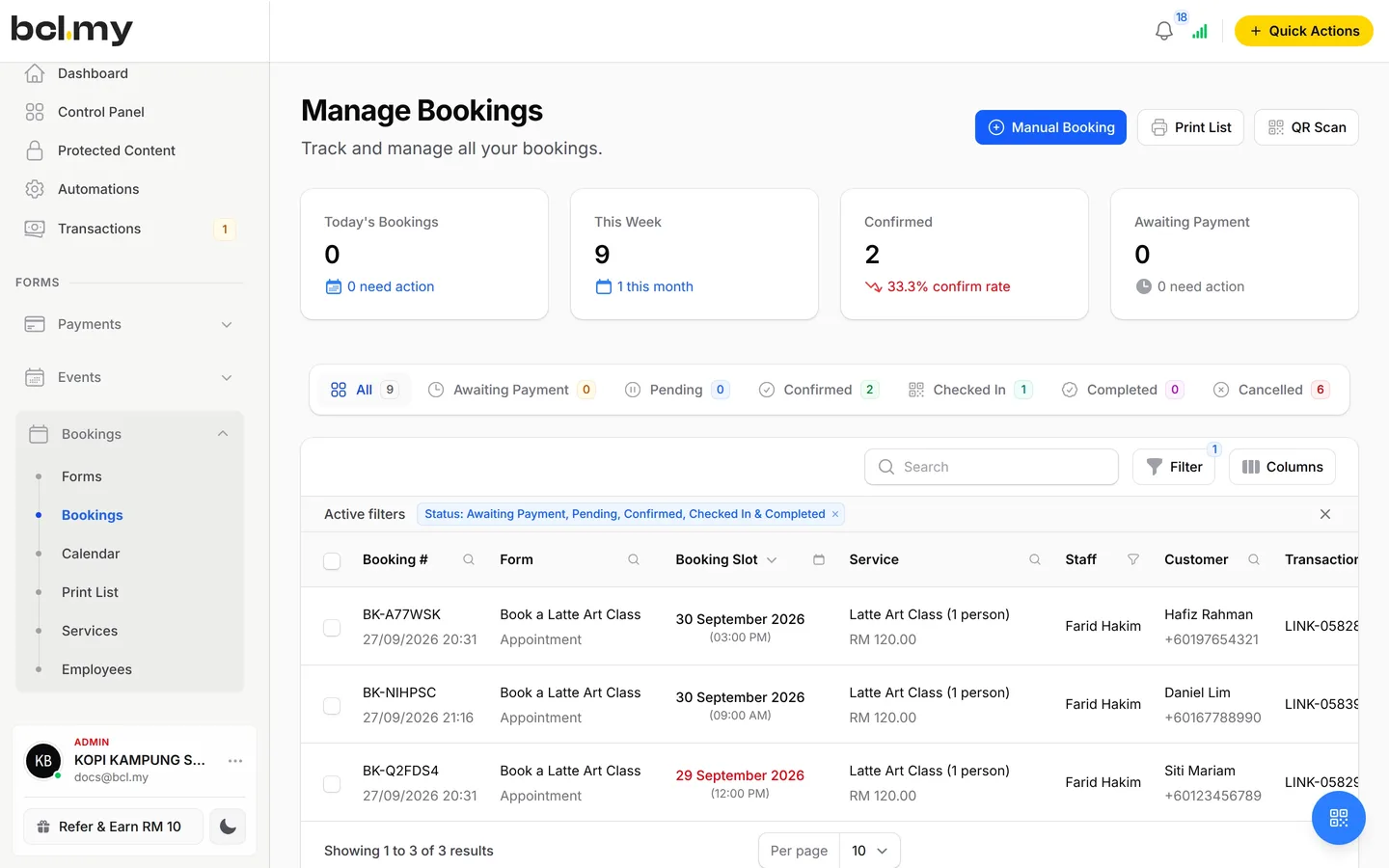
Add a booking by hand with Manual Booking, and move it with Reschedule.
QR check-in
Every booking email has a QR code. Scan it on arrival to mark the booking Checked In.
Booking statuses
Follow each booking from Awaiting Payment to Confirmed, Checked In, Completed, Cancelled or No Show.
Who uses it
Salons, restaurants, gyms and tuition centres fill stylists' chairs, tables, courts and trial classes with it.
How your customers pay
Customers pay online when they book, by FPX or DuitNow QR as standard. Cards, e-wallets and Buy Now Pay Later appear once Bayarcash switches them on.
Money goes through Bayarcash to your bank and BCL records the sale. Real payments need an approved Bayarcash account. You can build and test your booking form in Test Mode first.
- Standard

- Cards

- E-wallets



- Buy Now, Pay Later



- Cross-border QR





Good to know
Limits to check before you build, and the add-ons that some features need.
- Appointment services need at least one employee in Assigned Staff. Reservation, Ticket, Accommodation and Court need none.
- A new employee starts with every day Off. Switch on their working days or customers cannot book them.
- An unpaid booking is cancelled after about 15 minutes.
- Day & Time Rates allow up to 20 rates per service.
- There is no refund button. Refund outside BCL, then cancel the booking.
See it live
Opens a live example page. Please do not pay.
- Booking Book an Appointment at Studio Rambut Seri Appointments from the Hair Salon template Studio Rambut Seri, a hair salon taking appointments Open the example
- Booking Reserve a Table at Restoran Asam Pedas Melati Table reservations from the Restaurant Reservation template Restoran Asam Pedas Melati, a family restaurant taking table reservations Open the example
- Booking Book a Class at Studio Gerak Ceria Class bookings from the Fitness Class template Studio Gerak Ceria, a yoga and HIIT studio in Shah Alam taking class bookings Open the example
- Booking Book an Escape Room at Bilik Kunci Rahsia Time-slot tickets from the Escape Room template Bilik Kunci Rahsia, an escape room selling group tickets Open the example
- Booking Stay at Chalet Muara Cherating Room and chalet stays from the Resort & Chalet template Chalet Muara Cherating, a family kampung chalet by the river in Cherating Open the example
- Booking Book a Badminton Court at Dewan Seri Aman Court bookings from the Badminton Court template Dewan Badminton Seri Aman, a community badminton hall renting courts by the hour Open the example
- Booking Book a Visit at Klinik Mesra Taman Seri Appointments from the Medical Clinic template Klinik Mesra Taman Seri, a neighbourhood family clinic Open the example
- Booking Book a Dental Appointment at Klinik Pergigian Senyum Appointments from the Dental Clinic template Klinik Pergigian Senyum, a family dental clinic Open the example
- Booking Book a Treatment at Serai Wangi Spa Appointments from the Spa & Wellness template Serai Wangi Spa, a day spa taking treatment bookings Open the example
- Booking Book a Coaching Session with Langkah Jaya Coaching Appointments from the Private Coaching template Langkah Jaya Coaching, a business and career coaching practice Open the example
- Booking Book a Photo Session at Studio Lensa Cahaya Appointments from the Photography Studio template Studio Lensa Cahaya, a small photo studio for portraits, families and products Open the example
- Booking Book Your Raya Family Photoshoot at Studio Raya Kita Appointments from the Studio for Raya Shoot template Studio Raya Kita, a Raya season family photo studio Open the example
- Booking Book a Car Service at Bengkel Auto Pak Din Appointments from the Car Service Center template Bengkel Auto Pak Din, a neighbourhood car workshop Open the example
- Booking Book a Weekly Class at Pusat Tuisyen Bintang Class bookings from the Tuition Center template Pusat Tuisyen Bintang, a tuition centre taking weekly class bookings Open the example
- Booking Join a Workshop at Akademi Niaga Kecil Class bookings from the Workshop & Seminar template Akademi Niaga Kecil, a small business training provider Open the example
- Booking Book Buffet Ramadan 2027 at Dapur Tok Wan Time-slot tickets from the Buffet Ramadan template Dapur Tok Wan, a restaurant selling Buffet Ramadan tickets Open the example
- Booking Tickets for Taman Rama-Rama Bukit Awan Time-slot tickets from the Tour & Attraction template Taman Rama-Rama Bukit Awan, a butterfly garden selling entry tickets Open the example
- Booking Book an Island Trip with Bot Pak Mat Langkawi Time-slot tickets from the Boat Tour & Island Trip template Bot Pak Mat Langkawi, a small boat operator running island trips Open the example
- Booking Book a Room at Rumah Tumpangan Kenanga Room and chalet stays from the Simple Room Booking template Rumah Tumpangan Kenanga, a small guesthouse in Ipoh Open the example
- Booking Book a Futsal Court at Arena Futsal Sepakat Court bookings from the Futsal Court template Arena Futsal Sepakat, a futsal centre renting courts by the hour Open the example
Questions owners ask
Malaysian booking needs, from weekend rates to customers who pay in person, answered here.
Is there an online booking system for Malaysian businesses?
BCL is an online booking system for Malaysian businesses with five booking types: Appointment, Reservation, Ticket, Accommodation and Court. Customers pick a service, a staff member and a time and pay online, and the booking lands on your calendar. Staff hours, Day & Time Rates, walk-ins and rescheduling are built in.
What can customers book?
Five types: Appointment (spa, clinic, salon), Reservation (table booking), Ticket (museum, tour), Accommodation (hotel, homestay, room) and Court (badminton, tennis, futsal).
Can I charge more on weekends?
Yes. On the service's Pricing tab, add a rate under Day & Time Rates, choose Sat and Sun and enter the Rate per booking. You can also set a rate for a date range such as school holidays.
Can I add a customer who pays at the counter?
Yes. Click Manual Booking, choose the form, service, date and time, enter the customer's details, set Booking Status to Confirmed and click Create Booking.
Can I start before my Bayarcash account is approved?
Yes. New accounts start in Test Mode, so you can build and try your forms first. Test payments go to the Bayarcash sandbox and nothing is charged. Your forms keep working after you connect Bayarcash.
How do refunds work?
BCL has no refund button. Return the money to your customer yourself (for example by bank transfer), then cancel the order in BCL so your records match.
Step-by-step guides
Set it up with the help pages on docs.bcl.my.
Ready when you are.
Set up your first form today and try it out. When you are ready for real payments, connect Bayarcash and the same form goes live.