
From paid to posted.
Charge the right delivery rate at checkout, then create the shipment from the order and keep the tracking number on it. Shipping rates need no add-on; couriers need the Courier Integration add-on.
Trusted by these companies













































What you get
Set your own rates, charge by weight and book the courier without leaving BCL.
Your rates, your rules
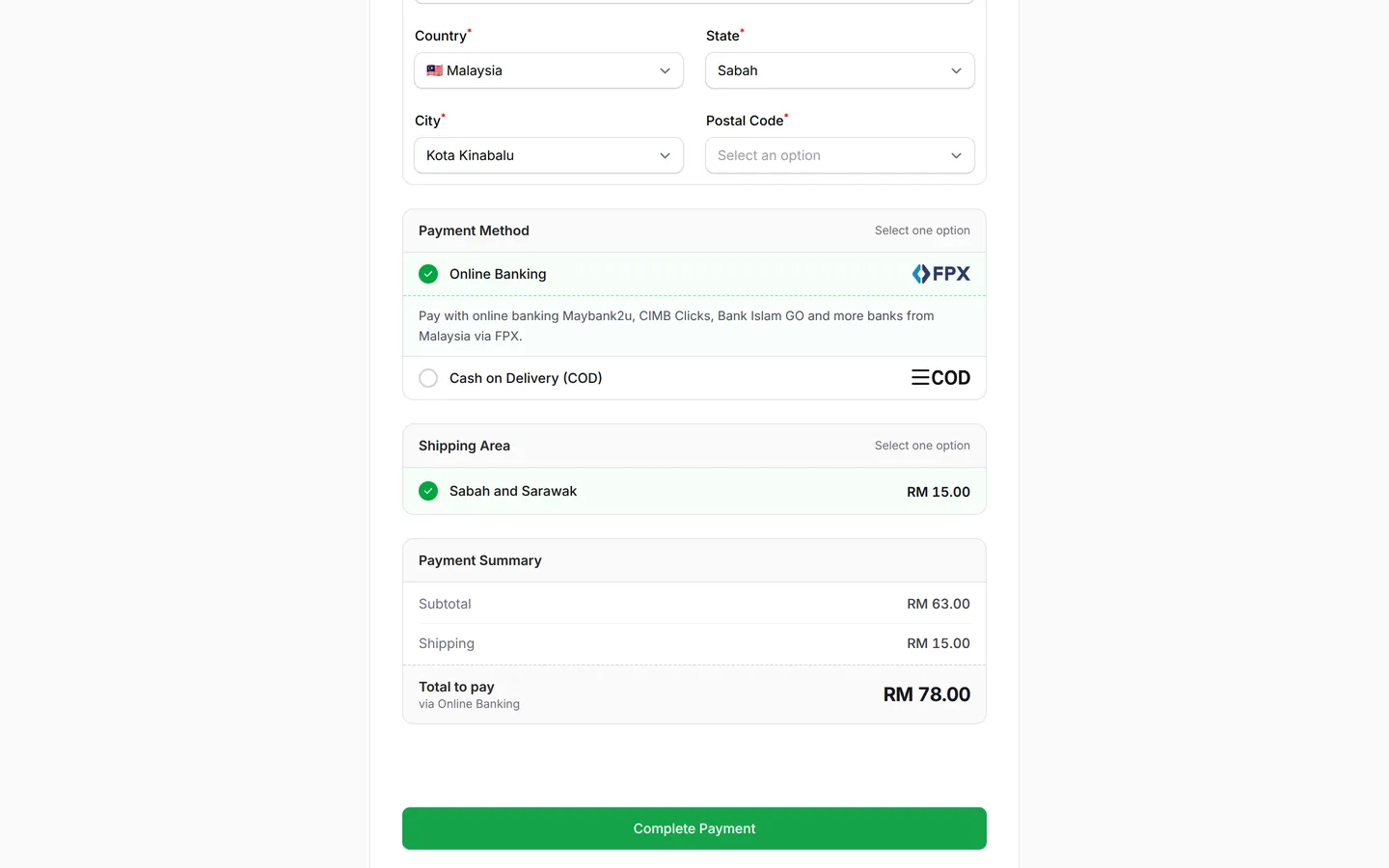
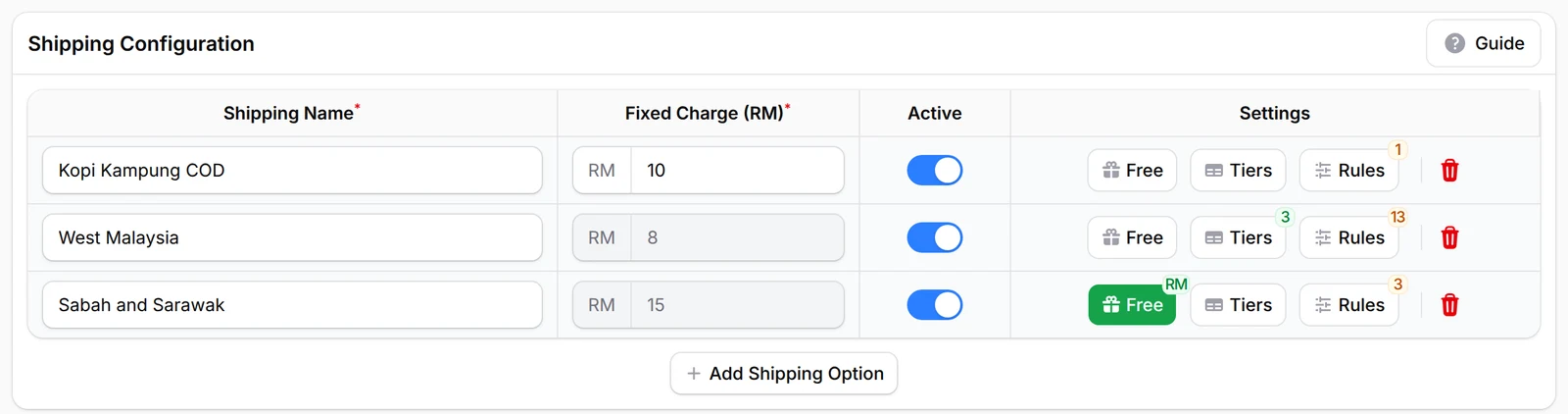
Add up to 6 shipping options in Shipping & Rates, each a fixed charge or a weight or quantity table, with its own rate for Sabah and Sarawak. Free shipping can start above an order amount you choose. With the COD & Manual Transfer add-on, Rules show each buyer only the option for their state; without it, buyers pick the right one themselves.
Charge by weight, automatically
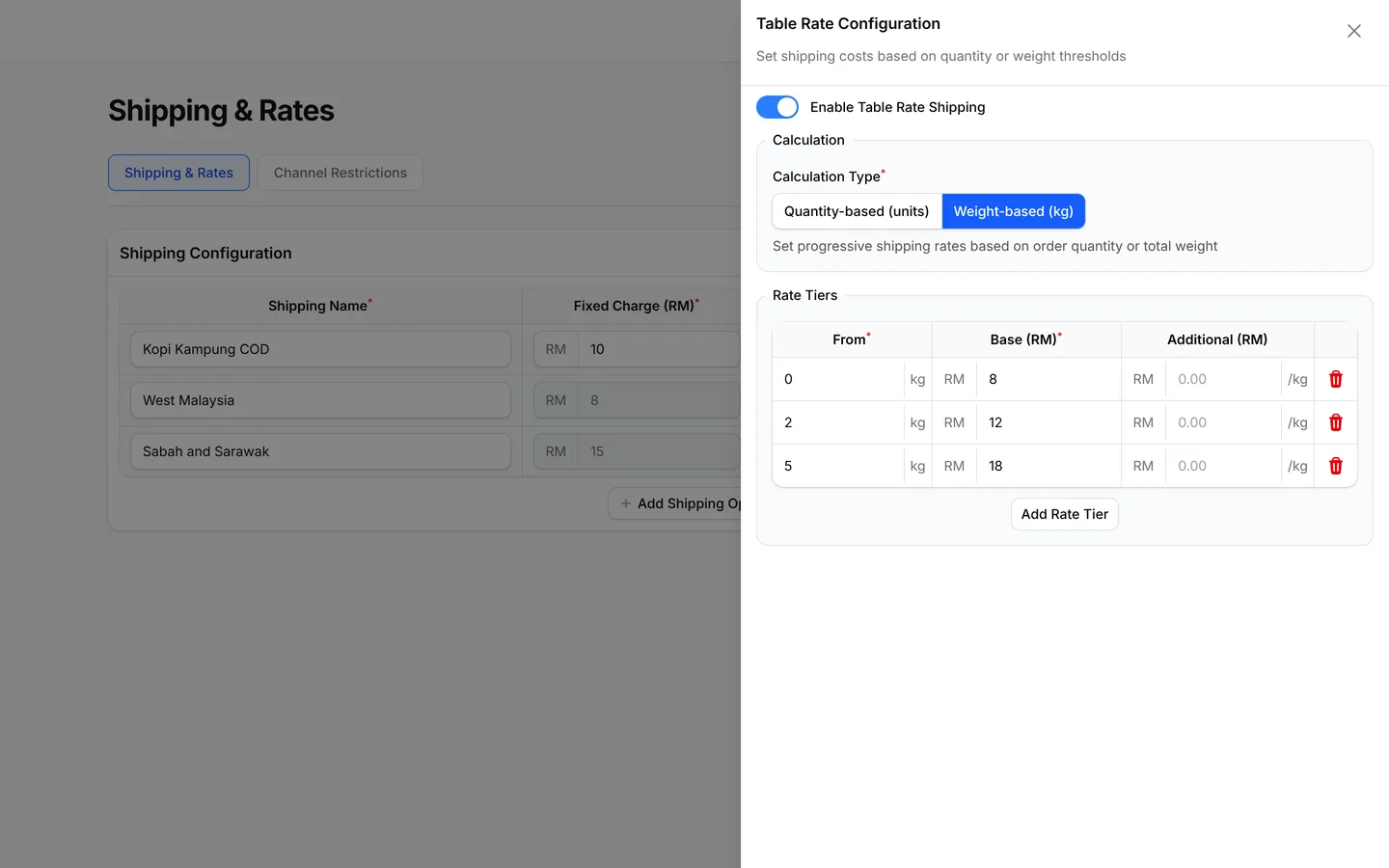
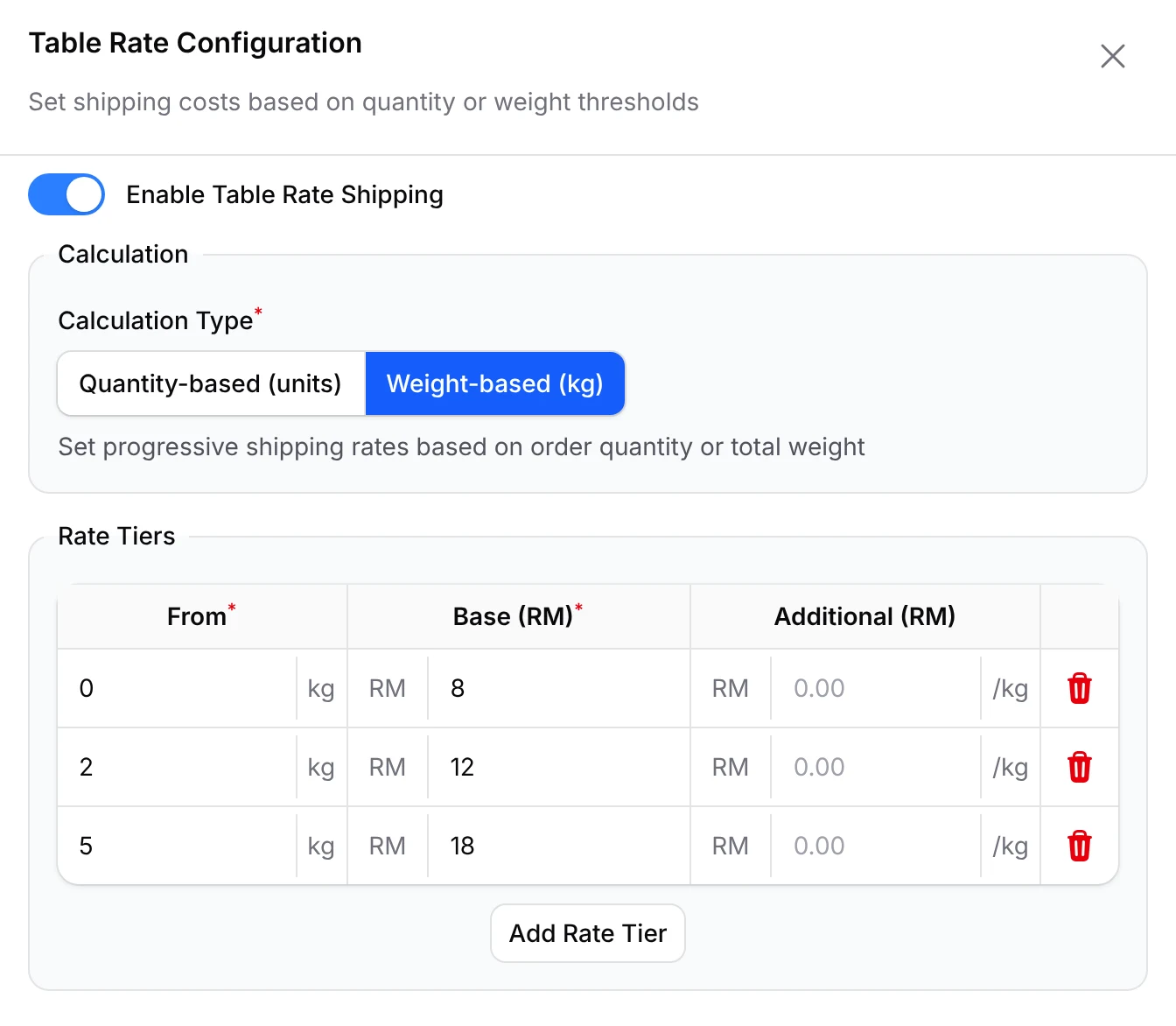
Turn on Enable Table Rate Shipping and set tiers by weight in kg or by quantity, up to 20 tiers per option. BCL adds the right charge at checkout from the order's total, which ends working it out by hand and undercharging on heavy parcels. Give every item a weight in the form first.
One click from order to airway bill
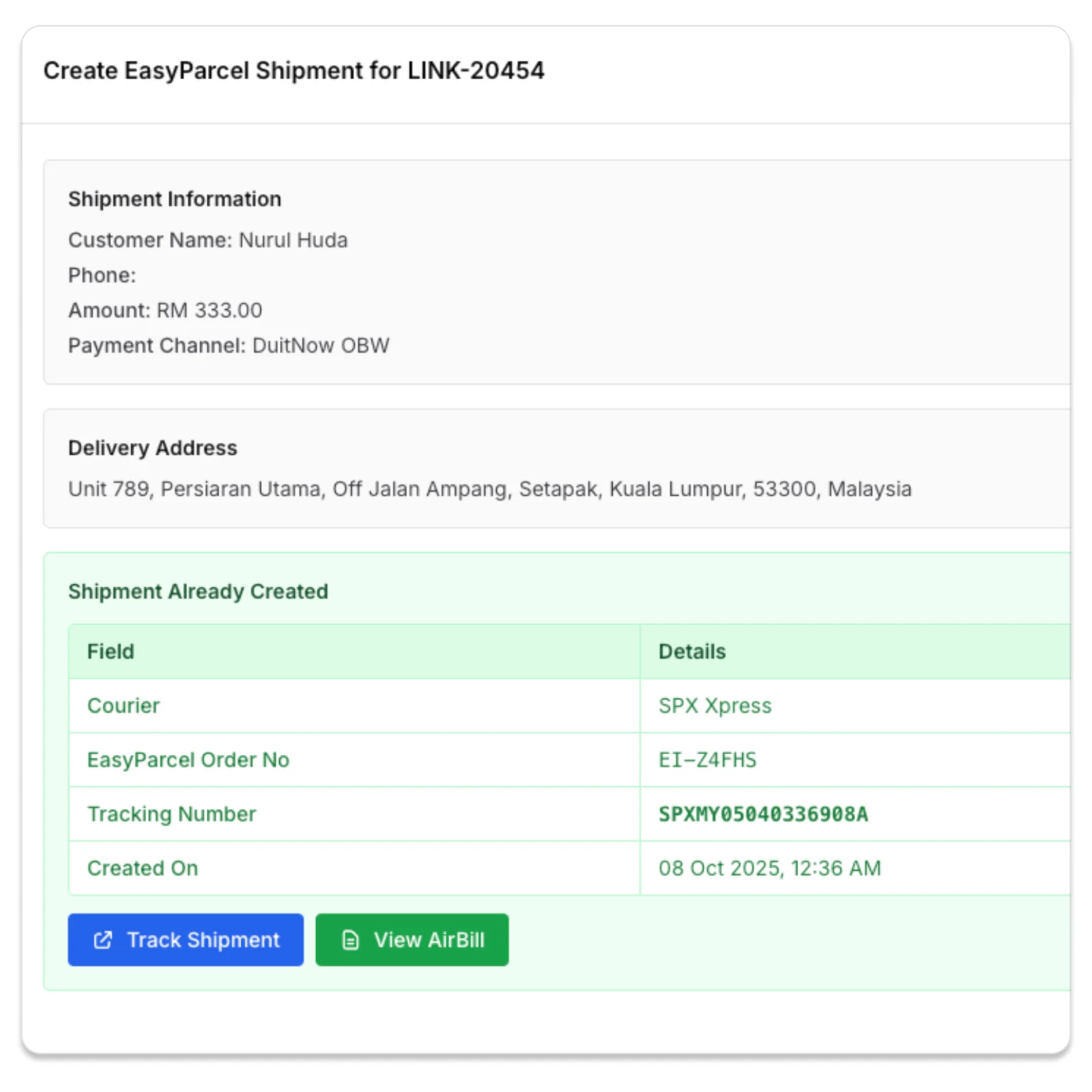
With the Courier Integration add-on, click Create Shipment on a paid order in Transactions, pick a courier and confirm. BCL saves the tracking number on the order, and View Airway Bill opens the waybill to print. No retyping addresses into a courier site.
What you can do
Offer up to 6 options, free delivery rules, region pricing, five couriers and tracking updates for buyers.
Up to 6 shipping options
Each with a Fixed Charge (RM), or Tiers that are Weight-based (kg) or Quantity-based (units), up to 20 tiers.
Free shipping rules
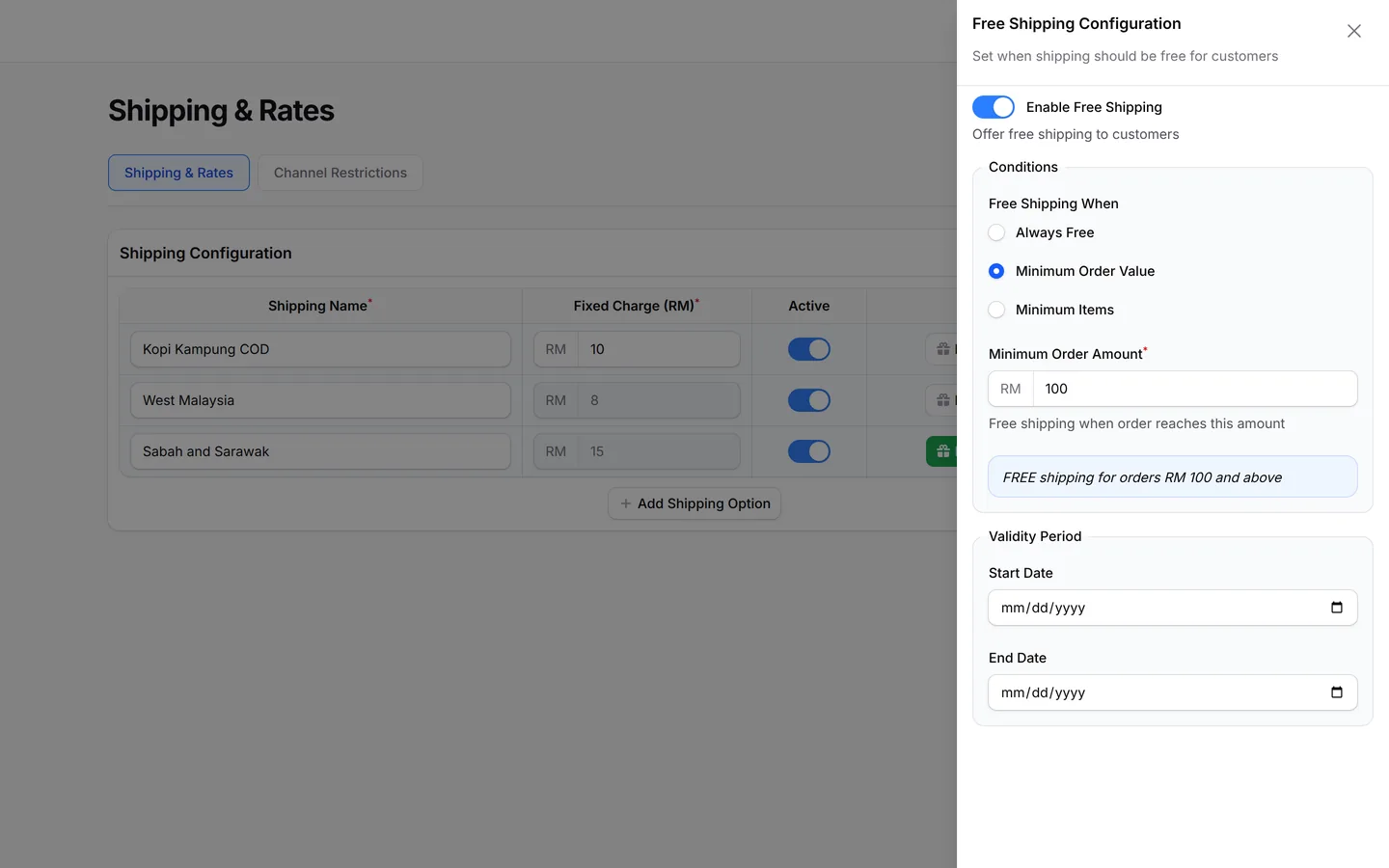
Always Free, Minimum Order Value or Minimum Items, with a Validity Period for a promotion.
Region rules
Limit an option to certain States/Cities, or to Malaysia, Singapore or Indonesia under Countries. Rules need the COD & Manual Transfer add-on.
Five couriers
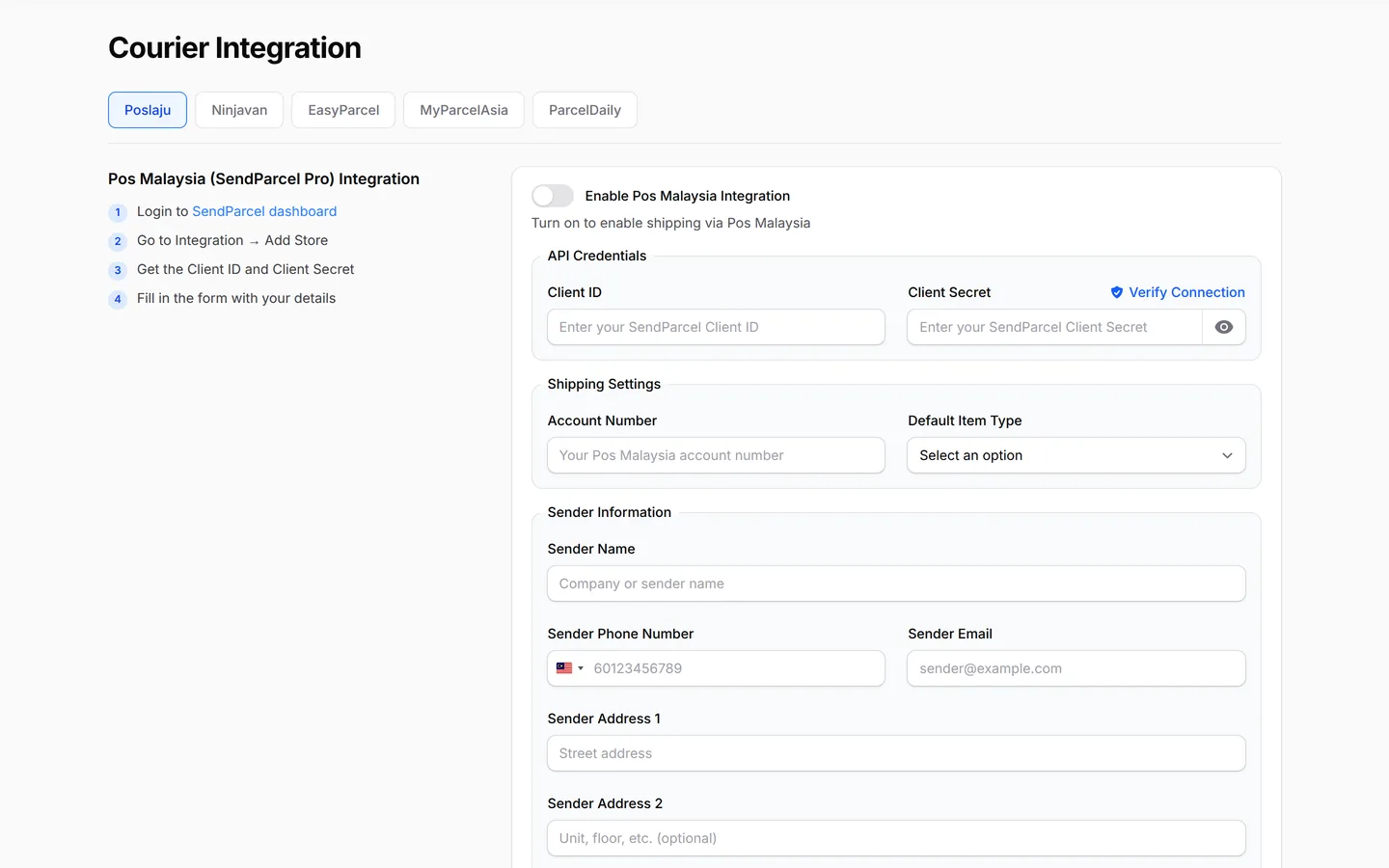
EasyParcel, Ninja Van, Pos Malaysia, MyParcel Asia and ParcelDaily, connected under Platform Setup → Courier Integration. Needs the Courier Integration add-on.
Shipments from Transactions
Compare EasyParcel rates per order, or use Bulk Ninja Van for many orders at once. View Airway Bill and Track Shipment from the order.
Tracking updates to the customer
An automation can email the customer the courier and tracking number when the shipment is created. EasyParcel also offers optional SMS or WhatsApp tracking, which EasyParcel charges for.
Couriers you can connect
With the Courier Integration add-on, create shipments with these couriers straight from Transactions, and your customer gets the tracking updates.




Used by
Baju kurung parcels by weight with Ninja Van and cookie tins with an East Malaysia rate.
Jobs it helps with
Good to know
Limits to check before you build, and the add-ons that some features need.
- Needs the Courier Integration add-on.
- Rates need no add-on. Courier shipments need Courier Integration; limiting a rate to some states needs COD & Manual Transfer.
- A weight-based option cannot be chosen while the order's total weight is 0 kg. Every physical item needs a Weight.
- Shipping rates follow the state, not the postcode.
- EasyParcel charges shipments to your EasyParcel credit, and there is no bulk print for EasyParcel waybills.
- A Ninja Van shipment needs item weights and a delivery address in Malaysia.
See it live
Opens a live example page. Please do not pay.
- Payment form Frozen Durian Delivered: Kebun Durian Pak Long Shipping rates by weight Kebun Durian Pak Long, a durian orchard shipping frozen durian Open the example
- Payment form Raya Cookies by Dapur Kak Mawar Multiple Items, stock and a coupon Dapur Kak Mawar, a home baker selling Raya cookies by the jar Open the example
Questions owners ask
Peninsular versus Sabah and Sarawak rates, free shipping thresholds, missing courier options and waybills.
How do I charge one rate for Peninsular Malaysia and another for Sabah and Sarawak?
Add two shipping options, then click Rules on each one and choose its states in States/Cities. Rules need the COD & Manual Transfer add-on; without it, customers see both options and pick one themselves.
Can shipping be free above a certain spend?
Yes. Click Free on the shipping option, turn on Enable Free Shipping, choose Minimum Order Value and enter the amount. Orders below it still pay the option's charge.
Why don't I see the courier option on an order?
It shows only when the courier is enabled under Courier Integration, the Courier Integration add-on is active, and the order has items and a full delivery address.
How do I print the waybill?
In Transactions, click the green truck icon on the order, choose the courier, then click View Airway Bill. Print it from your browser or save it as a PDF.
Do I need my own courier account?
Yes. EasyParcel needs your EasyParcel account with enough credit, plus its API key. Ninja Van needs a Ninja Van shipper account, which you link with Connect with Ninja Van or with API keys.
Can I use more than one courier?
Yes. Enable each courier on its own tab under Courier Integration, then on each order click the truck icon and choose the courier. EasyParcel lists several courier services with their rates, so you can pick one per order.
How does pickup work?
For Ninja Van, set the Pickup Type to Pickup from your address or Drop off at PUDO Outlet, and choose a Delivery Timeslot. Fill in your pickup address under Sender Information.
Do I need an add-on?
Not to start. Payment forms, payment links, coupons and transactions need no add-on. Add-ons unlock Event Management, Lead Forms, OTP-Protected Content, COD & Manual Transfer, LHDN E-Invoice and Courier Integration. Each is monthly or yearly, renewals are invoiced (never auto-charged), and you can cancel yourself.
Can I start before my Bayarcash account is approved?
Yes. New accounts start in Test Mode, so you can build and try your forms first. Test payments go to the Bayarcash sandbox and nothing is charged. Your forms keep working after you connect Bayarcash.
Step-by-step guides
Set it up with the help pages on docs.bcl.my.
Ready when you are.
Set up your first form today and try it out. When you are ready for real payments, connect Bayarcash and the same form goes live.