
Ask your AI about today's sales.
"How much did I sell this month?" Your assistant looks it up in BCL. With your permission it can also make a payment link or a coupon, and every request is logged.

Trusted by these companies













































What you get
Your assistant answers from real sales data, signs in once and leaves a log of every request.
Your AI reads your real BCL data
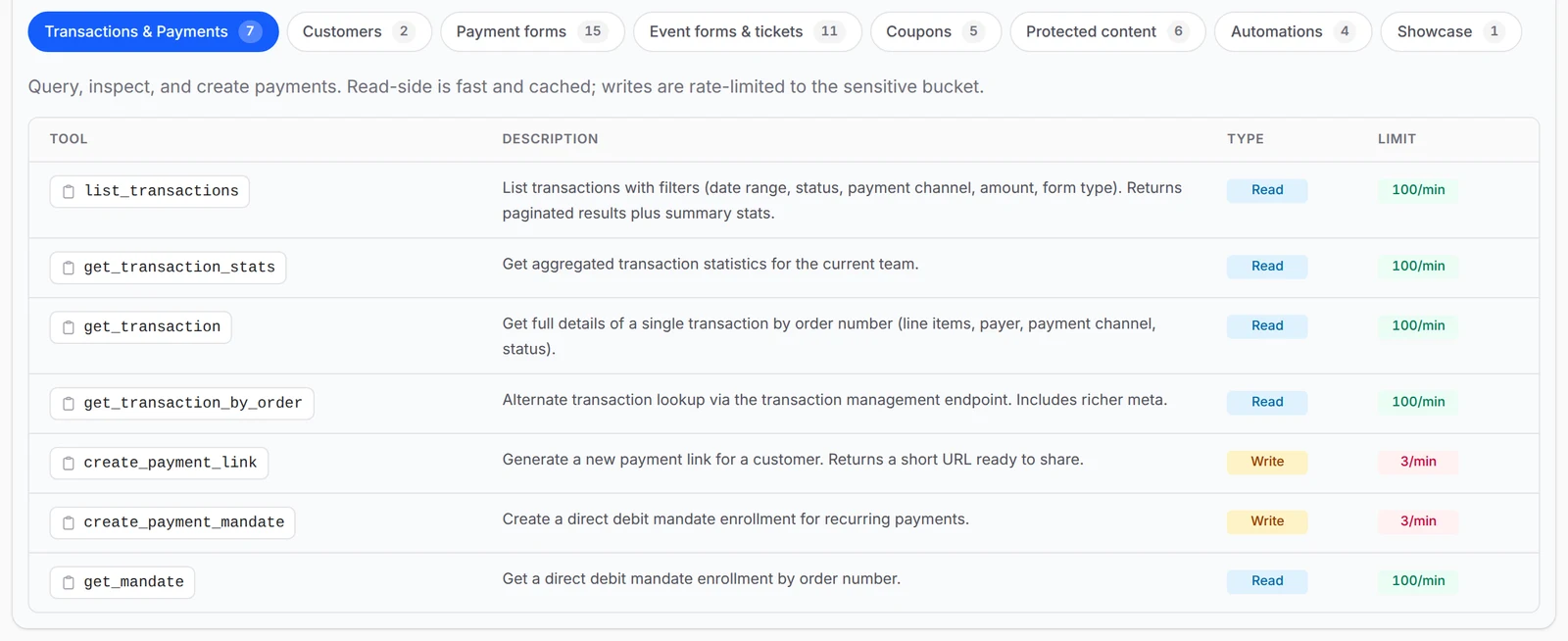
Ask your AI assistant for this month's sales, failed payments, one order or your top customers, and it looks the answer up live in BCL. The Capabilities tab lists all 62 tools, each marked Read or Write, so you know exactly what an app can touch. Totals count live payments only, leaving out Test Mode.
Works with the AI you already use
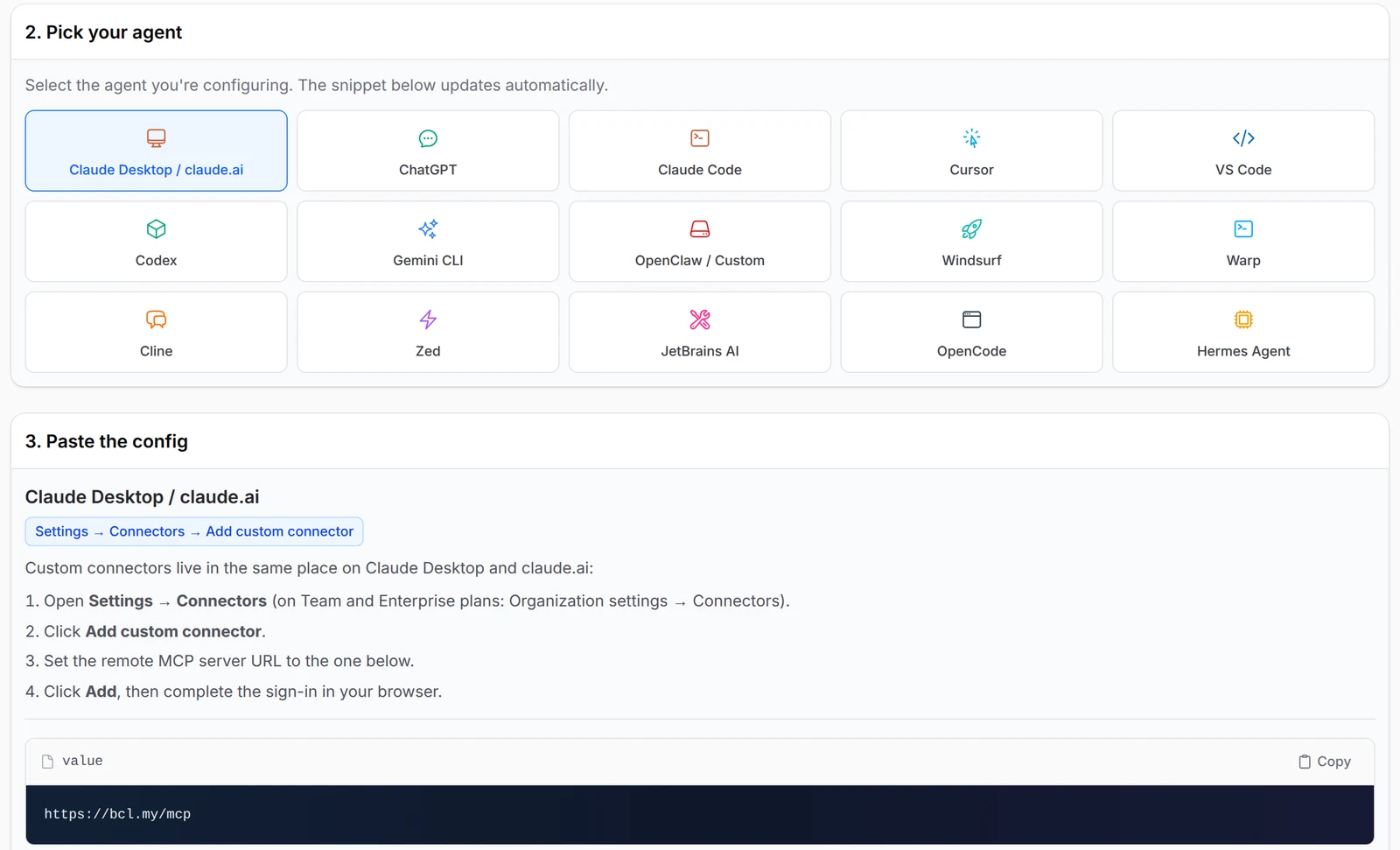
Claude, ChatGPT, Claude Code, Cursor, VS Code, Gemini CLI, Windsurf, Zed and more: the Quick start tab lists 15 apps. Pick yours and BCL shows the exact steps for that app, with nothing to install on the BCL side. Most apps sign in through the browser, while a few use a Personal Access Token.
One address, sign in once
Copy https://bcl.my/mcp from the OAuth connector tab, paste it into Claude or ChatGPT and sign in with your BCL account, with no token or config file to manage. A consent screen shows the app's name and the permissions it wants before you click Authorize. Revoke it any time under Connected Apps.

See every request it made
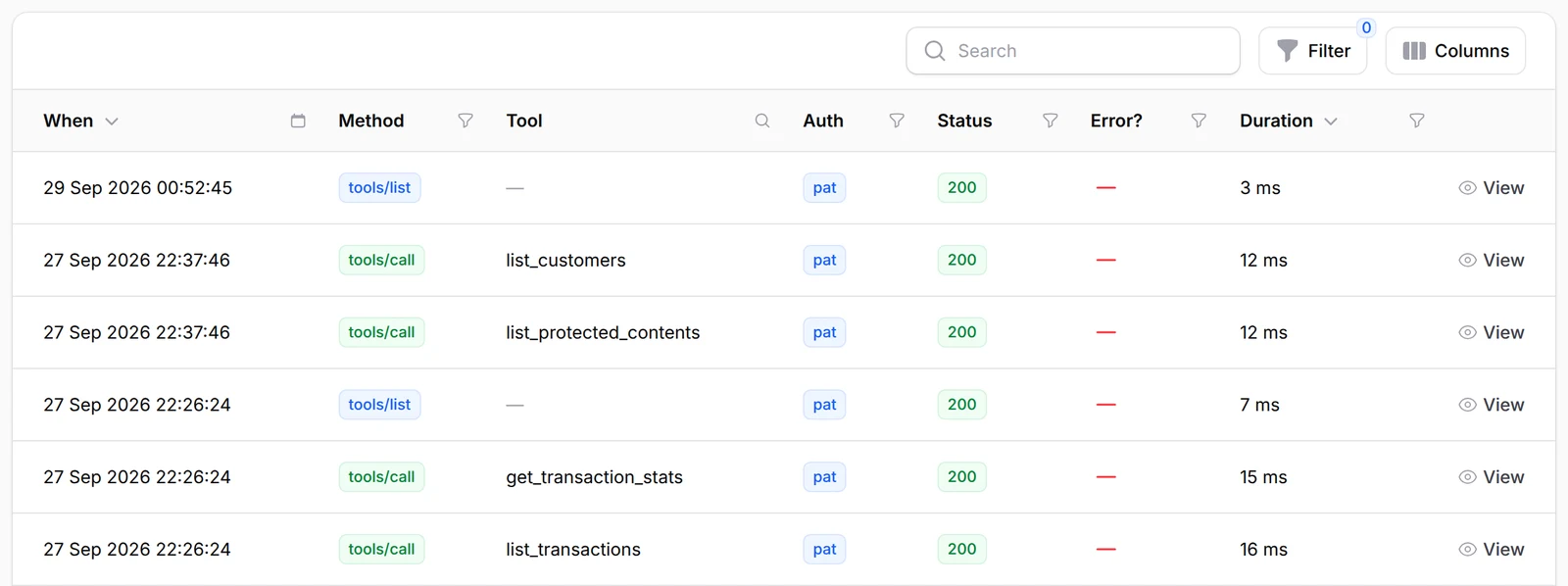
The MCP Audit Log records every request an AI app made on your account: the tool, the time, and whether BCL accepted it. If something changed that you did not ask for, you can see which app did it and cut it off. Only Admins can open the log.
What you can do
Connect Claude, ChatGPT, Cursor or VS Code to 62 tools, with read-only or write access as you choose.
62 tools
30 that read and 32 that write, with the same checks as the BCL API: payment links, Direct Debit mandates, customers, forms, events and tickets, coupons, protected content and automations. See them on the Capabilities tab under Platform Setup → Connect AI Agent.
Claude & ChatGPT by sign-in
Add https://bcl.my/mcp as a custom connector, sign in to BCL and click Authorize. No token or config file needed.
Cursor, VS Code & others
Use an API token with MCP Read or MCP Write ticked.
Read or write, your choice
mcp:read for looking things up; mcp:write for creating and updating payment links, coupons and forms.
Protected content & automations
See who has access and change access rules. Read your automations and their run history.
Rate limits
Sensitive tools such as creating a payment link are limited per minute, so a runaway agent cannot flood your account.
Used by
Owners ask about sold-out tarts, weekend coupons, failed fee payments and VIP seats left.
Jobs it helps with
Good to know
Limits to check before you build, and the add-ons that some features need.
- Sales and customer tools count live payments only. Test Mode payments are left out.
- The tools cannot delete, build a form from scratch, upload files, send messages, or change payment, key, company or team settings.
- They cannot read booking forms, lead forms, participants or affiliates.
- Only Admins see Connect AI Agent and the MCP Audit Log.
- The assistant sends your BCL data, including customer names, emails and phone numbers, to the AI provider when it answers you.
- The audit log shows which tool ran, not the values sent.
Questions owners ask
Connecting your AI, test payments it cannot see, cutting off access and checking what it changed.
Can I connect BCL to an AI like Claude or ChatGPT?
Yes. BCL has an MCP server at https://bcl.my/mcp. Add it as a custom connector in Claude or ChatGPT, sign in with your BCL account and click Authorize. The steps are under Platform Setup → Connect AI Agent.
Why does the AI say I have no sales, when my dashboard shows test payments?
The AI tools count live payments only. Payments made in Test Mode do not appear in the sales totals, transaction list or customer totals.
How do I stop an AI app from reaching my account?
Go to Platform Setup → Integrations, open the API Token tab and revoke the app under Connected Apps. Its access stops straight away.
Can I see what the AI changed, for example the new price it set?
No. The log shows which tool ran, when, and whether it worked, but not the values sent. Check the form, coupon or content itself in the dashboard.
What is MCP?
MCP (Model Context Protocol) is an open standard that lets AI apps use other services safely. The BCL MCP server at https://bcl.my/mcp gives your AI app 62 tools: 30 that read and 32 that write.
Can the AI change things without my approval?
It can only make changes if you give it write access: mcp:write when you click Authorize, or MCP Write on an API token. Without it, the AI can only look things up. ChatGPT also asks you to confirm every action that changes something in BCL.
What is BCL, and how does it work with Bayarcash?
BCL is a no-code selling platform for Malaysian small businesses: you build payment forms, payment links, tickets and bookings, share one link and see every sale. Bayarcash is the payment gateway behind it: it collects the payment and pays it out to your bank, minus its fee. To take real payments you need an approved Bayarcash merchant account.
Can I start before my Bayarcash account is approved?
Yes. New accounts start in Test Mode, so you can build and try your forms first. Test payments go to the Bayarcash sandbox and nothing is charged. Your forms keep working after you connect Bayarcash.
Step-by-step guides
Set it up with the help pages on docs.bcl.my.
Ready when you are.
Set up your first form today and try it out. When you are ready for real payments, connect Bayarcash and the same form goes live.